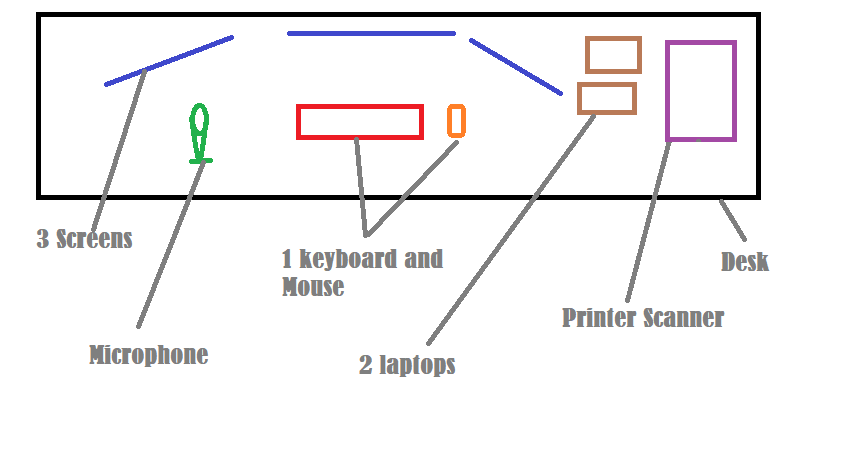
I have three computers that I work on most of the day. I need to be able to watch the screens on all of them for messages etc but will only be working on one at a time. Two of the three are laptops for which I would rather have a separate monitor and keyboard rather than moving up and down the desk depending on which machine I am working on.
I can get three monitors in a nice arc around me easily enough but then I end up with three keyboards and three mice which is not good. Is there anyway to have one keyboard and mouse and to switch computer it is connected to without pulling out the USB connector each time?
I have the same issue with a microphone and headset but that is less of an issue. There is also a printer/scanner that is hard wired to the machine under the desk and wireless connect to the laptops so is also not a problem.
Can anyone suggest how I solve the keyboard issue?
You will be wanting a KVM then I guess - that's been the traditional way of managing these things. Just need to be super conscious of which machine you are currently connected to before doing anything drastic. 🙂
Traditionally you'd want a KVM, but these days you can just use a USB switch. Plenty on Amazon.
KVM stands for Keyboard Video Mouse, you'd traditionally connect VGA and 2xPS/2 to get the video/input routed between multiple computers. If you don't want a single display then you just need to switch USB.
Of course a neater solution would be an input sharing system so you don't need to actually switch inputs, but just control the input on the other displays when you push off the left of one screen. Presumably you're using Windows?
The obvious question is "why three computers" and not one with all the applications running, and three monitors.
Here's a USB switch that ought to do what you want, most are for 2 computers...
Another way would be (if they're on the same network) to load up the main computer with kb/mouse attached, then have a couple of RDP sessions to the other 2 laptops, you can then have these on the 2nd and third monitors.
It's common for IT guys to rdp to a laptop that's 2ft away on their desk rather than having to deal with switching keyboard/mouse every few seconds. Why make life harder that it needs to be?
There's various software tools that lets you control multiple PCs on the same network using one keyboard and mouse, kind of like a software KVM (no need to Remote Desktop or VNC).
Microsoft have a freebie called Mouse without Borders
https://www.microsoft.com/en-gb/download/details.aspx?id=35460
There are various others available too (some free, some paid for);
https://alternativeto.net/software/mouse-without-borders2/
1 Home computer with full admin rightsd
1 Client Computer.No admin rights and cannot install anything
1 Work computer. No admin rightsd and very restricted on what can be installe.
This seems to allow 4 computers which is good as I also have a home laptop which I use occasionally but didn't originally mention so not to confuse things.
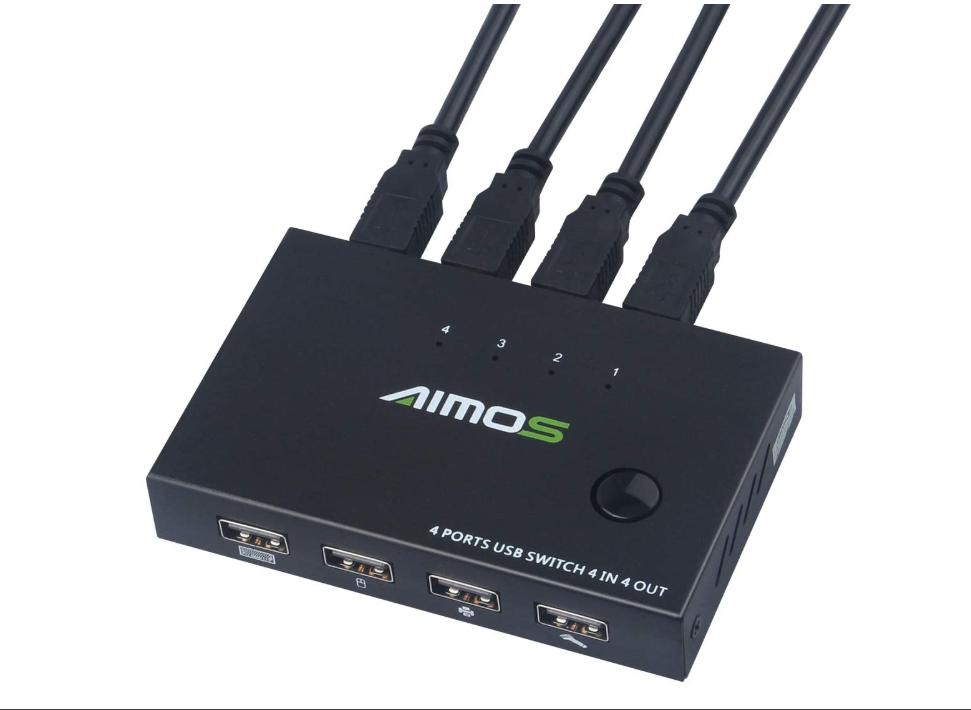
https://www.amazon.co.uk/AIMOS-Printer-Switcher-Sharing-Keyboard/dp/B07QYRCYQQ/ref=sr_1_3?dchild=1&keywords=usb%2Bswitch%2Bfor%2B3%2Bpcs&qid=1589967788&sr=8-3&th=1
So I buy that. I run a USB out to each of the computers. I plug in my wireless keyboard/mouse USB, Printer and microphone and everything just works, right?
I just need to remember which computer I am typing on at any one time.
Wrong image showing in link - give me a minute
This one
TESmart 4K KVM Switch HDMI 4X1 3840x2160@30Hz with 2 Pcs 5ft KVM Cables Supports USB 2.0 Device Control up to 4 Computers/Servers/DVR (Black)
Visit the TESmart Store
3.6 out of 5 stars 3 ratings | 5 answered questions
Price: £89.99 FREE One-Day
Voucher
Apply £10.00 voucher Details
Pay £89.99 £83.99: Get £5 extra with your first Top Up. *Minimum spend £80. Click here to claim offer.
Note: This item is eligible for click and collect. Details
Share your monitor, keyboard&mouse between your 4 computers - Saved you a lot of money and headache, not having to buy more monitors and keyboards (not to mention the space required for all the extra hardware)
Easy to switch in multiple ways - 1. Front Panel Buttons, 2. IR Remote Control, 3. Keyboard Hot Keys, 4. Mouse Gesture Fast Switch, 5. Auto Switching in a specified time interval (adjustable)
No set up required, Just plug and play - Support 4K@30Hz widescreen monitor, KVM with fast switching and with EDID emulators keep PC's windows don't resize when you switch computers
Extra USB 2.0 - Able to share a USB HUB, printer, headphones/microphone, storage, webcam, and backup USB drives etc between PC's
Multiple operating systems - Support Unix/Windows/Debian/Ubuntu/Fedora /Mac OS X/Raspbian/Ubuntu for Raspberry Pi and other Linux based system
https://www.amazon.co.uk/TESmart-3840x2160-Supports-Control-Computers-4-Port-Black/dp/B07KCXJQM6
From your home pc, bring up a command prompt (cmd) and once you can get the ip addresses of the other 2 machines (command prompt, then type ipconfig - look for the ipv4 address) try and ping them from your home pc.
Command prompt: then type "ping *ip address*" so "ping 192.168.1.1" for example. If you get a response you can then rdp to them and don't need to muck about with switches or anything. It'll be like they're windows running on your home computer.
You are Terry Pratchett and I claim my five pounds
There's some software the guys at work use called Input Director for doing just this - I think they only use it for swapping between a PC and a laptop, don't know if it can do 3.
Just drag the mouse off one screen onto the other screen and then the keyboard / mouse inputs goes to the laptop
I use a ugreen usb 3.0 switch (from Amazon) for 2 computers, works well for keyboard, mouse, headset, webcam.
3 computers seems less common. Simple way is to use a USB 3 hub with peripherals hanging off, then get a USB3 extension lead for each computer to a point on the desk and just move the plug for the hub between each as needed.
If they are locked down work PCs there is a reasonable chance they have RDP turned off. Also when the RDP session is open the screen will go off so all screens will need to be connected to the 'master' pc. That may or not be possible depending non the machine spec.
The one I found is £22.99 with free delivery. May not do as much as OldTennisShoes does for £89.99 but I can see £60 or reason to go with mine.
AIMOS USB 2.0 KM Switch, 4 in 4 Out USB Printer Sharer Switcher Hub 4 PC Sharing 4 USB Devices Switch Box For Mouse, Keyboard, Scanner, Printer, Etc- With 4 USB Cables, 1.6 M
Anyone saying what I propose won't work?
Logitech wireless mouse and keyboards allow you to switch between multiple devices, you just need to buy a USB adapter for each (other makes probably do, but I have only seen it for logitech).
See if you can plug your printer into a usb port on the back of your router, lots now have that functionality.
Clear the clutter from your desk.
The one I found is £22.99 with free delivery. May not do as much as OldTennisShoes does for £89.99 but I can see £60 or reason to go with mine.
Sorry, I'm just confusing things - the one I posted includes monitor too, which you don't need. Yours will be perfect.
oldtennisshoes - I guessed that was the difference. I don't think I would want that though as I need to see all three screens to pick up messages from different sources - Lotus Notes - work, Outlook - client, MS Teams - both and STW home.
If they were all on one screen I couldn't do that
Okay, I have spent some time looking around the sites to see what is available based on the previous comments and advice given.
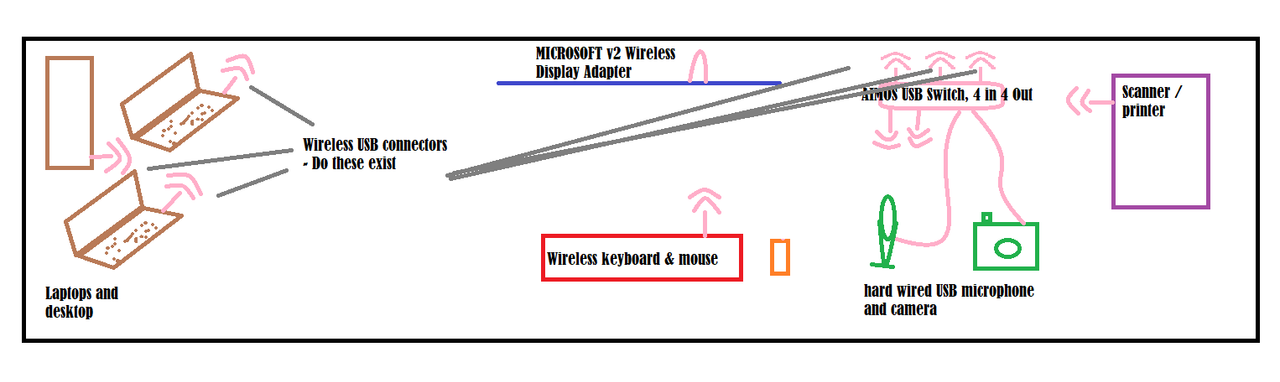
My new thinking is that I stick the two laptops up one end of the desk so I can see their screens if any messages pop up. The desktop will continue to live underneath. I will use the Microsoft Wireless display adaptor to allow me to mirror which ever computer I want to onto the main screen in front of me.
I will have a single wireless keyboard & mouse connected to the 4 way USB switch along with the wired microphone and camera.
I would like the laptops to be able to connect to the USB switch wirelessly to reduce the desk clutter. I am guessing that there might be a dongle to dongle solution for this but does this really exist. Also, will all the wireless to wireless links in such close proximity cause issues?
Ok I've not read all the stuff in between...but looking at your first post you don't need hardware, just software KVM e.g. I use Barrier:
https://github.com/debauchee/barrier/
My setup - imac in front of me, one laptop to the left, another to the right. One keyboard and mouse in front of me. When I move the mouse off the right of the imac it moves onto the laptop, similarly the other way. The keyboard types into whichever one the mouse cursor is on.
I also sometimes remote (with windows remote desktop) onto either laptop to use the big screen in front of me if I'm using it any length of time.
IA - No admin rights on the laptops. Not allowed to install software on clients machines.
Microsoft have a freebie called Mouse without Borders
I never knew that existed. I've just installed it and it's ace, cheers for that.
I do this via a much easier way;
- Step one - get monitor(s) with USB-C in and USB port on the monitor
- Step two - get wireless keyboard and mouse which works via USB dongle
- Step three - plug USB dongle into monitor
That's it, then anything you connect via USB-C to the monitor will switch to using the single keyboard/mouse. If you are super lucky then the single USB-C connection will also transfer video from laptop to monitor, and power the laptop. If it's not as modern you'll need to use separate cables in addition to the USB-C for the video out and power in.
I have the following Bluetooth keyboard & mouse but they only for 3 devices.
Logitech K380 Wireless Multi-Device Keyboard.
Logitech M720 Triathlon Wireless Mouse, Multi-Device, Bluetooth and 2.4 GHz with USB Unifying Receiver.
timmys - reading this after I just hit Buy on other stuff. Might try your idea anyway if I get a newer monitor
Microsoft have a freebie called Mouse without Borders
That too but I haven't tried it yet.
If you are super lucky then the single USB-C connection will also transfer video from laptop to monitor, and power the laptop.
For googling porpoises, what you're describing there is Thunderbolt.
Interested in this - I have work and home computer both on at once with 2 keyboards & moices and I have about a once weekly hit rate for typing something on the "wrong" system and sending something weird (but not yet obscene) to a colleague !
(to confuse me more I have 3 screens but the big one is on a HDMI switch so I can have work laptop expanded onto it during work hours and home pc expanded onto it after that)
This keyboard can swap between computers with a key combination https://www.keychron.com/products/keychron-k2-wireless-mechanical-keyboard?variant=31063869718617 I also use the Logitech MX Master 3 which can swap between computers when you press a button
DOes someone know, for the mouse without borders or fancy keyboards/mice, do they have to be on the same network ?
Although my laptop and PC arer plugged into the same router I THINK the laptop totally ignored my home network & just connects via its VPN
Do we think those options would still work ?
(I see that the microsoft MWB is free so I'll be attempting that but I suspect the laptop'll refure to let em install anyway - I do know that a wireless logitech adaptor will work in it though as the keyboard I'm using is one of those cheapo wireless ones)
(I also log into each with different account names & p/w)
For googling porpoises, what you’re describing there is Thunderbolt.
That’s Apple specific branding isn’t it? So could lead you down the wrong google hole if you are unfortunate enough to be doing it with Windows machines as I am (work laptops). Though in fairness it works perfectly.
I have ordered a Logitech MK850 which can switch between 3 machines. Do I need a separate dongle for each of the machines it will be connecting to or is there some clever wireless magic that it does?
The support suggests that it will use bluetooth to switch between machines.
I've got a Logitech MX ergo. There's a button on it that switches between devices.
I initially tried one using the dongle and one on Bluetooth but the connection was v flaky. Adding another Logitech dongle to the other machine made it pretty responsive.
Not tried with 3 devices though.
Quick question on the USB-C things and monitors.
Am I correct in thinking that if I buy this
And plug the dongle from this keyboard and mouse
https://www.amazon.co.uk/gp/product/B01MT5WLHY?ref=ppx_pt2_dt_b_prod_image
This will be possible
– Step one – get monitor(s) with USB-C in and USB port on the monitor
– Step two – get wireless keyboard and mouse which works via USB dongle
– Step three – plug USB dongle into monitor
That’s it, then anything you connect via USB-C to the monitor will switch to using the single keyboard/mouse. If you are super lucky then the single USB-C connection will also transfer video from laptop to monitor, and power the laptop.
I’ve got Logitech and it switches between 2 Bluetooth and 1 USB Dongle fine. Did try it on 3 x Bluetooth, but it kept disconnecting when the 3rd laptop went into standby. Could have fared with power settings I suppose.
But generally have +ve experience of the Logitech approach.
I have an old logitech K400+ with sticky keys I am replacing as this ................................... bugs me when typing... Will the dongle work with the new keyboard?
I don't know if it meets your requirements and haven't got time to check the destructions - just noticed this on the Dell premium keyboard I'm using - it would suggest you can switch between three different Bluetooth devices. The mouse that comes with it works in sync
[url= https://live.staticflickr.com/65535/49919524363_a47541c105_k.jp g" target="_blank">https://live.staticflickr.com/65535/49919524363_a47541c105_k.jp g"/> [/img][/url][url= https://flic.kr/p/2j4dBqx ]2020-05-21_05-35-48[/url] by [url= https://www.flickr.com/photos/85252658@N05/ ]davetheblade[/url], on Flickr
Edit - my eyes are terrible, not sure what the symbol next to #1 is