Does the gestalt mind of this parish know of any way of splitting the accessory/docking port of an iPad into 2?
Specifically I'd like to be able to charge while using VGA out but, with the exception of [url= http://www.instructables.com/id/Adding-USBcharging-to-iPad-VGA-adapter/ ]bodging a USB charging lead into the VGA adaptor plug[/url], can't find a work around.
Much obliged,
P
Does it have to be VGA? No HDMI input available? Cos the [url= http://store.apple.com/uk/product/MD098ZM/A?fnode=MTc0MjU4NjE ]Digital AV Adapter[/url] has an HDMI & accessory port on it.
It's for projectors and they mostly don't have HDMI, otherwise I'd have one of them. A bit frustrating!
[url= http://store.apple.com/uk/product/MC748ZM/A?fnode=MTY1NDA0OQ ]Composite AV cable[/url]
I think there is a Component AV cable available too (though I can't find it in the Apple Shop).
If the projectors don't have Composite or Component inputs then I [u][i]think[/i][/u] you can just use something like a Component YPbPr to VGA adapter:
[img] 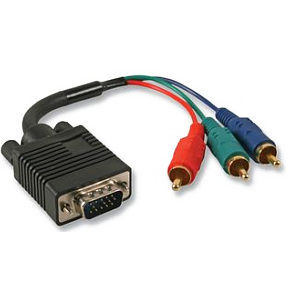 [/img]
http://www.tvcables.co.uk/cgi-bin/tvcables/vga-to-ypbpr-cable-3m.html
Cheers chaps. I think the composite cable along with the YPbPr to VGA adaptor should do the job.
Noooo...
That "TVCables" adapter is for COMPONENT not COMPOSITE.
[url= http://en.wikipedia.org/wiki/Component_video ]Component[/url] has separate Red, Green and Blue video signals, one on each plug.
[img]  [/img]
[url= http://en.wikipedia.org/wiki/Composite_video ]Composite[/url] has the whole video signal on a single plug, usually yellow.
[img]  [/img]
Composite often has two additional plugs (red and white). Hence the confusion. But they carry the audio signal. Don't go plugging them into the video ports!
Right, proper confused now. I'm going to find a projector and see what coloured holes there are to stick things into. Hopefully it will all make more sense after that.
Cheers for the advice.
P
Actually just read this thread on Apple Support:
https://discussions.apple.com/thread/2786194?start=0&tstart=0
Looks like ONLY the VGA cable and the HDMI cable let you do mirroring on the iPad anyway, so the Composite/Component stuff is probably a complete dead end anyway (if that is what you want to do).
Sorry.
But if you just want to play movies (rather than mirror) then that will work.
Probably.