Forum menu
*Fascinating discussion coming up*
So, the files on my laptop are a mess. By files, I am predominantly talking about pictures and videos (GoPro etc).
A lot of them are organised by date/event, so I'll have a 2012 folder, within that a Highlands camping trip folder, a beach day folder, and so on.
But then another load of files are organised by type, so for example, a folder named Travel, and then within that a separate folder for each holiday.
So if I was on a holiday in 2012, does it go in the 2012 folder, or the Travels folder?
Again, fascinating subject I know, so control yourselves, but how do you all go about organising your files? About to back everything up so figured I may as well have a bit of a tidy up...
I have " on the pc" " on the hard drive " and " probably lost"
That's what I am really trying to avoid! 😛
Folders are named in reverse date so they always sort properly. If I can be bothered I tack a description on the end. I don't sort any other way as it gets complicted. Picasa collects everything together I can tag photos with names etc if I want.
i.e todays was
2013-03-25 Metal in oil (after changing the oil in my rear differential 🙁 )
[url= http://farm9.staticflickr.com/8371/8588923589_a67878646e_z.jp g" target="_blank">
Looking back, I've been using this method since 2002, and also use it for my daily job packs on the work laptop. Works great teamed up with the search box in the folder as you can type part of the description and suddenly all the likely folders appear.
organise, you say ? .............
I've been considering this recently also as just about to install a new 2tb HD. for all my pics I'm going to create a folder called .... wait for it... 'Pictures' and then within that I will have a folder for every year and then within them a folder for every month. At the mo I have a big folder called pics and within that lots of random folders called things like 'Honeymoon' and 'Italy 2009' - Also I will try and put all the pics and vids from my phone into the relevant folder on my new drive.
It gets ridiculous with a contemporary digital life, every holiday generates about 3/5gbs of pics/vids.
I have some major subject groups: walking, biking, family etc. under those, I just have folders for each trip/day. The folders are named in "YYYY-MM-DD description" format.
It gets ridiculous with a contemporary digital life, every holiday generates about 3/5gbs of pics/vids.
Totally agree, I went to SE Asia last Summer for 3 weeks, came back with about 40gb of pics/vids!
I think I'll go through and organise everything by date rather than subject. It's just pretty handy being able go to the "Bike" folder and all bike pics are there..
I have noticed however, that I much less of a "stream" of pics going onto my PC, as I no longer use my compact camera, but rather my iPhone, and the pics get backed up onto Dropbox, and half decent ones put straight onto Facebook. Whereas "events" where I take a whole bunch of pics/vids within a few hours/days will be copied onto the PC.
Can you tag folders (not the folder name) in Win7?
All my pics and vids are in folders titled with the event and the date such as French Holiday 2010, Lakes MTB 2009 etc, works for me and easy to do general search for things
Are there any programs that will scan a bunch of folders and come up with potential re-names, and allow me to easily edit them? ie if it has 29.1.12, it gives me the option of changing it to 2012_2_29, rather than me having to go through them all?
I delete most of the pics I take.
There is no way I am ever going to go through gig and gigs of pictures, keeping that many just makes it all the less likely I will look at the good ones.
Organise? Let me see...
Nope, still confused, can you explain, maybe using simpler terms?
Historically mine are just dumped where the camera sync puts them, which is me\Pictures\date. It's not ideal, but it doesn't really matter if you use something like Lightroom or Picasa to browse through them. Tagging is the future, but I'm too apathetic for that.
Whenever I upload pictures they automatically go into a folder for the relevent month...
I use to very anal about correctly storing files, but now with Windows search is so easy, I don't worry about it anymore. And its not like there's a storage issue anymore - well not like when I started as a Programmer and we'd only use 2-characters for the Year...
But surely Windows Search only works if you tag/rename the images, or can remember the date of the event?
You only name the folder ie. 2013-03-26 Alps Holiday. If I have photos from two different things, I split them into their own folder, same date but different description.
I don't file any more, I just search. Files get dumped in Documents and then I search for anything I want. Command-Space and start typing on a Mac is way faster than opening Finder and drilling down through folders.
Pictures do into Aperture and I let it deal with organising, music goes in iTunes and likewise.
Computer use is much less stressful when you detach from the files and just deal with the content as appropriate.
Porn, and trash. Are there other kinds of files?
With photos, firstly they are all named as date and time, e.g. 20120126_204007.filetype
Then I have two main folders, one archived by date, which has every photo by year and month, and the other by event:
[img] 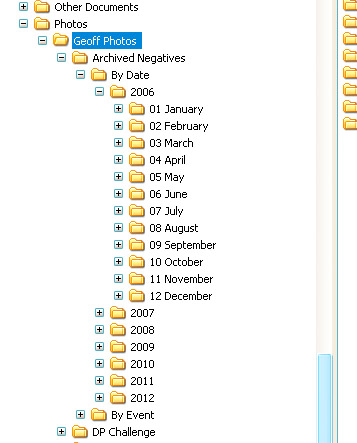 [/img]
Lightroom and tagging.
Tucker, do you have two copies of every photo then?
Why do folk name folders etc.. by date when all the files have a date stamp associated with them anyway?
If you stick them in folders etc.. which are descriptive as to the content, then at least you will have something meaningful to search on in the future.
Tucker, do you have two copies of every photo then?
No. I keep a copy of everything I take in RAW format, plus a quicko 800 pixel height jpeg conversation. Then, any that are worth keeping, get a 800 pixel high jpeg lovingly made and are stored together with a copy of their respective RAW files in the By Event folder.
Why do folk name folders etc.. by date when all the files have a date stamp associated with them anyway?
I can't speak for these other folk, but my reason is because it works for me perfectly.
Photos I have a RAW version and JPEG. RAW are sorted by date in reverse data format to make sorting like others have said. Proocessed JPEG's are by type (Car, Bike, Events, etc), then sub catagory (so car has each car I've owned, or event type) then if needed another level under that (so car would have maybe location or event etc). Tags for descripton throughout.
Just makes it easy to go and look for say pictures of bikes and they are all there, so easy to find.
Videos sorted by pre or post edited. For post it's then by type, format (HD etc) then file with tags. Unedited are by type, then date.
All other files are sorted by category (Finance, House, etc), subcat then date.
All work is sorted by client, then phase then deliverables - mail structure replicates this so I can find an file in an instant. My head just works in phases so it fits my thinking.
I need to get out more I think 😕