Forum menu
I have some Bluetooth headphones. They work fine for listening to music.
Until someone phones me.
If I get a call while they're plugged in, everything goes wrong. I hate taking a call on the headphones, it messes with my head, I want to take the call on the handset. But if I turn the headphones off, what they do is first disconnect the incoming call and then redial the last number I called, which IS COMPLETELY INSANE and makes me do an angry while I scrabble around frantically trying to disconnect the new call. So I just take my headphones off to avoid listening to a ringtone at full volume, let the calls ring off, and go back to listening to my music—which is a bit rubbish.
Is it possible to listen to music on the headphones but take calls on the handset? Hell, I'll buy new headphones if need be. (The current ones are August EP650s and they behave the same on iOS and Android.)
iPhone? If so:
- Settings
- General
- Accessibility
- Call Audio Routing
- Choose Speaker
RM.
I love you and want to have your babies.
Two things.
1) on my phone, if I get a call whilst wearing a headset, I get a pop-up on the phone asking me to select source (it defaults to the headset). Then in-call there's a button on the dialpad to change source. Does yours not do this?
2) Look at the BT pairing in settings, see if you've any option to change what it allows or if there's any options (I can't remember offhand and my headset is at home). If you can pair it as headphones rather than a headset, it shouldn't route calls I don't think (as there's no microphone).
I get the same as Cougar on my iphone, just pick handset.
Does yours not do this?
Don't think so, I think it's just a normal incoming call screen. Certainly haven't noticed a popup offering a choice of source.
see if you've any option to change what it allows
iPhone just has options for disconnecting or forgetting it. Haven't checked Android.
Hoping that Roger's advice will work though 🙂
Just had another call, and it seems Roger's off my Christmas card list.
That makes the call come out of the loudspeaker, not the earpiece. And, judging by the conversation, I think it uses the microphone on the headphones. So I had a frantic scrabble to try and get the audio coming out of the right hole, while the person on the other end was wondering why they could hardly hear me.
And there's definitely no option that I can see to take the call on the phone when it's ringing.
Back to the drawing board…
just get some airpods. double tap the headphone and it answers the call.double tap to end.
The point is I don't want to take the call on my headphones.
I think the only answer may be to use wired headphones, which is a bit of a pain, but hey.
Clearly an iPhone only problem 😉
On my Android phone, on BT settings I can disable phone audio from a device, which means calls happen on the phone as usual and only media audio goes to BT device.
*fishes out Android phone*
Ah! So you can. Thanks. No such options on iPhone.
I can definitely select how to take the call on my iPhone (7), Bez. At least I could before the iOS 11 update, presume I still can.
Hmm. I'll see if I can test it.
(I updated to iOS 11 on my iPad, it's caused several problems, I'm sticking with 10 on the phone for a while yet…)
Soz Bez! I do it the other way round - answer on BT speaker all the time - so I thought it would work in reverse.
The only other way I know on iPhone is when you have answered the call (on your headphones) is to fish your phone out, click on the audio button of the call control and choose iPhone instead of Speaker/Bluetooth as per following:
[url= 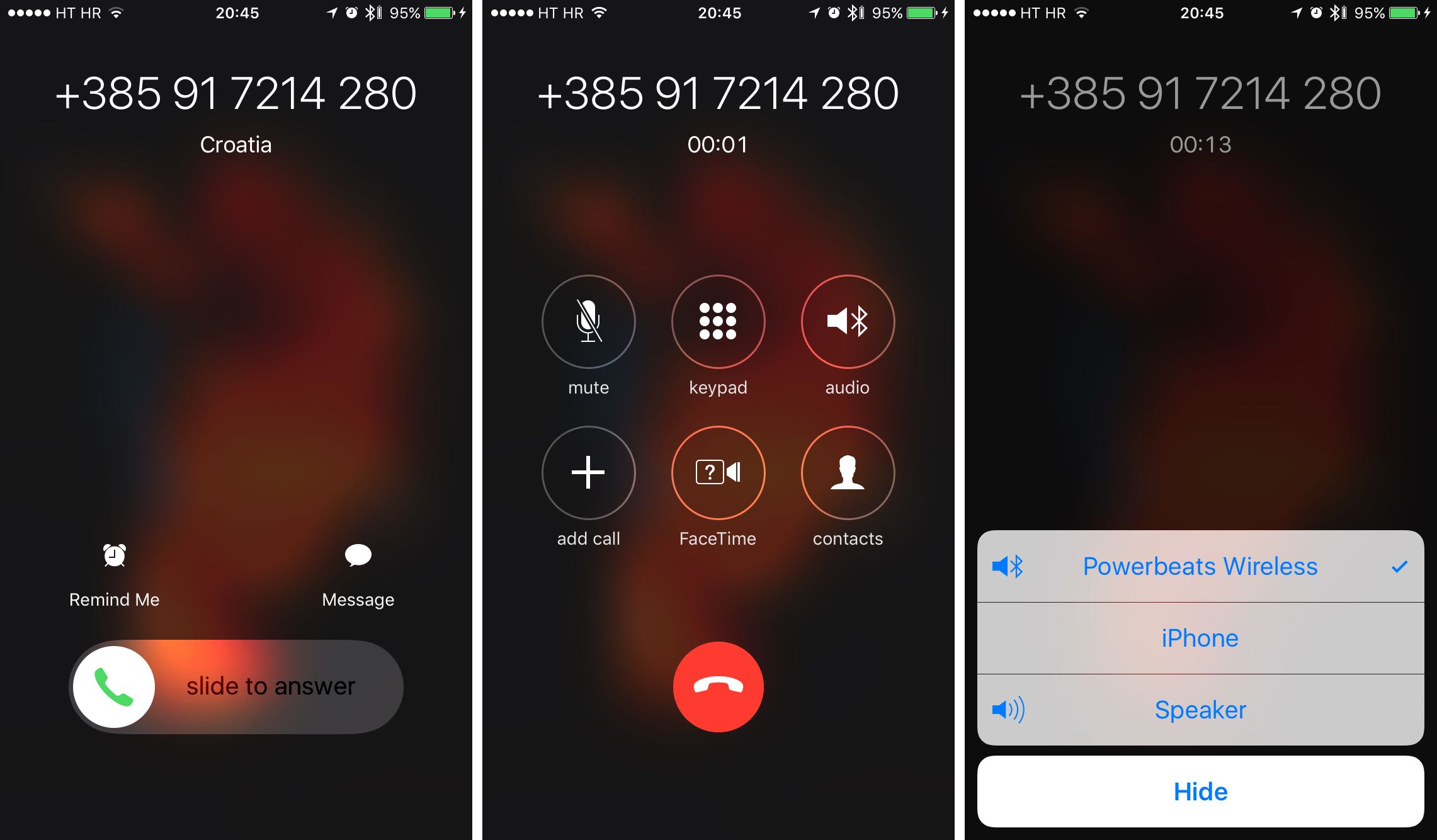 ]Click for picture - too big to embed.[/url]
Hope this gets me back on the list.
RM.
Thanks.
Yeah, I can find the "answer it, tap the Bluetooth button, select iPhone, then put it to your ear" solution.
Problem is, by the time I've done all that the other person's going to be confused as to why I've not said anything for a few seconds.
There's definitely no option for "answer this via the handset" while it's ringing, just the slide-to-answer widget.
Annoyingly one of the reasons I've just moved back from Android to iPhone (I've switched a good half a dozen times this year) was that the Android phone has another issue with Bluetooth, namely that it occasionally deafens me with terrifying white noise when I'm listening to music. Hey ho 🙂
Maybe I should just take calls on my headphones like a weirdo.
Nah just do the button press thing, they’ll wait.
Don’t get AirPods though, I’m sure they made them look stupid on purpose just to see what it would take to stop people buying apple stuff.
[quote=Bez said] I've just moved back from Android to iPhone (I've switched a good half a dozen times this year) was that the Android phone has another issue with Bluetooth, namely that it occasionally deafens me with terrifying white noise when I'm listening to music. Hey ho
I don't believe this is a standard Android phone feature 🙂
No, to be fair it was just a reason to stop using that specific phone 😉
[quote=prawny ]Nah just do the button press thing, they’ll wait.
Seems a bit rubbish to have to do that with an iPhone, when it's easy to do what Bez wants on Android. I'm kind of surprised you can't do it with an iPhone, as that presumably means you can't get it to connect to 2 different BT devices at the same time, which is the setup I have in my car and why I know about it (the built in BT only works with the phone, so I have a standalone BT device for music, but as that powers on when I unlock the car I disable phone BT on it so the built in BT which powers on with the ignition still connects for that - the built in phone BT works far better for the phone).