Forum menu
Seemingly out of the blue, mine laptop sounds has stopped working. Diagnosis is more difficult, as i stull get sound on skype. None of my media or youtube give me sound.
Checked drivers been at this for hours now and am throwinf myself at the mercy of the STW
Help me STW, you're my only hope
Sound through speakers and headphones on skype? Headphones work on anything else?
[img] 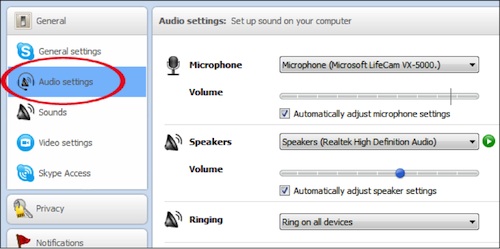 [/img]
What is in here on skype
What is going on in the windows sound info
[img]  [/img]
1) Speakers / Headphones (IDT High Definition Audio)
2)Speaker / Headphones IDT High Definition Audio Codec
Default Device
and
Communication Headphones IDT High Definition Audio Codec
Default Communication Device
And when the media is playing, then i right click the comm headphones and choose [test] i get sound for the few seconds of the test
If i do the same for Speakers / Headphones, i get nothing
also seems not to recognise when headphones are plugged in
If it's all the same then that makes it more interesting. No mute going on from the keyboard? Is there a more default audio device to try?
No, mute at Keyboard, that would mute skype too?
what is a 'more default' audio device?
in the audio selections is there anything else? Not more more I can suggest, sounded like skype was set to a different audio profile etc. but obviously not the case
I can choose (High definition audio device) as a driver
Give it a go, though the starting and going quiet is interesting. Other question is what changed before it stopped working
not that it starts and goes quiet. Only the [test] does that, where it plays short section
i've tried a restore to a few days back, no use
Often you can fix problems like this by uninstalling the hardware in the Device Manager, then rebooting. Windows will reinstall the driver. Good idea to note down what the hardware is first though so that you can download a driver online if need be.
On the sound display,click on the communications header,you may have it set to mute all sounds while skype is on? Don't know if this makes a difference?
also seems not to recognise when headphones are plugged in
Does the headphone jack double as an optical sound output? An issue I've had with older mac laptops in the past is the headphone jack being fooled into thinking an optical sound lead is attached and killing the sound to the speakers - peaking inside the headphone jack you'll see a light on. A few jiggly plug-in / unplugs sorted it
Is there grot in the headphone socket?
You could try the nuke from orbit approach, go to the download section of the laptop manufacturer's website, locate and install a fresh driver package.
That should hopefully reset any rogue settings to default..
Installed drivers no difference
In fact all sound works so long Skype is connected. Have looked at most s/w solutions online. None yet working.
Misleading thread title,
I was expecting a "sticky keyboard" type problem.
Disappointed of Worcestershire .