UPDATE: CLASSIFIEDS section refreshed, redesigned, searchable: Go take a look
will a 205 edge do miles,time,maps and, cals,counter.or will i need a better one. thoughts please
i use a 500
its excellent
800 Edge is probably the best, but you have to pay for it.
I've got the 800, but to be honest I don't use half of it's features.
If and when it gives up the ghost, it'll be replaced by a 200 which will be all I need for 99.9% of the time.
I got an 800 in December and the mapping and GPS functions have come in very useful. If you just want to track your rides it's probably overkill, though.
If you want mapping - 800, if you don't 500.
The 205 will do all the things you've asked about.
500 here, on the very rare occation I need the maps, my phone does it just as well. Quite enjoy planning rides on OS maps before hand anyway 🙂
On an aside the 500 has been fantastic, I've really not taken care of it, totally weather proof.
Does the 500 have a clock? I was set on a 200 until I read in the STW review it doesnt tell you the time of day, seems a bit of a shortcoming.
thanks all
Oops, just seen you said maps, I read it as laps! I think my 205 has a mapping screen but I've never used it so I can't say how good it is. It definitely has a clock though!
800 is a fantastic bit of kit - just don't get it too wet though....
500 user here. It is a great piece of kit. I have it either on the stems of my road bikes or in my backpack and it still works a charm. It fell out of my rucsack into a puddle in the rain and laughed it off. Go get one!! If you do get one from handtec as they are cheapest.
I have just got an Edge 200. Very pleased with it, but suspect it does not more than the 205, (probably even slightly less). Couldn't justify a proper mapping GPS like 80/Satmap, although I see the benefits of having one for xc riding.
200 seems quite simple to use, so far.
I love my Edge 200, if you program in a ride from the Garmin site it will show the route as a map, very handy when riding around back roads.
Its such a great device, possible the best thing i have ever bought fro the bike.
For a road bike its great, i can see someone wanting the 800 if they are doing a load of off road excursions.
Does the 500 have a clock? I was set on a 200 until I read in the STW review it doesnt tell you the time of day, seems a bit of a shortcoming.
Yes.
I've been looking at the Edge 200 myself. I know the navigation is basic but how does it perform in reality? Is it a waste of time or work reasonably well?
I got an edge 800 a few weeks ago. I've used it for nav and tracking fitness, great piece of kit. Had one or two probs with the garmin website software though, can't seem to edit courses I've created.
I like the 500. Training tool rather than a mapping / nav tool though.
Has it got a clock?
You can set the three screens to display any data you like (within reason 😉 )
I've been looking at the Edge 200 myself. I know the navigation is basic but how does it perform in reality? Is it a waste of time or work reasonably well?
if it is like the 500 - very good i did the whole of Lejog using the course function to follow
Garmin can be shockingly bad at supporting their product. I've had many stressful nights in front of the computer trying to make it work.....has let me down on the trails a lot too. That said I cant find an alternative so about to replace my 605 with a 800 if I can find a decent deal.
All that lovely easy userfriendlyness of Apple that we get on our iPhones? Garmin is too often the opposite of that.
^ i have found my 500 completely hassle free.
I've been looking at the Edge 200 myself. I know the navigation is basic but how does it perform in reality? Is it a waste of time or work reasonably well?if it is like the 500 - very good i did the whole of Lejog using the course function to follow
Anyone know if the Edge 200 and 500 mapping functionality is the same?
I'm a cheapskate, so I just use a Forerunner 110.
Tracks everything, gives me my HR & tells me my average speed, plus I can use it for other sports.
It would be nice to have a mapping one, but the amount I would use it, I don't think I could justify the cost 🙁
My first 500 had a broken line across the screen from new. I sort of ignored it for a while, until I found a spot where I was riding less, chucked them a mail, they gave me a return code and asked me to post it. Within a week a brand new one had arrived.
Fantastic service here.
Bought an extra set of the little brackets too, so can chuck it between bikes very easily, can't recall the last time I went out without it now.
Anyone know if the Edge 200 and 500 mapping functionality is the same?
it is not mapping as such - you can create a course (either on your comp, or using a previous ride) and then you just follow it, it warns you when you leave the course
see:
http://www.dcrainmaker.com/2009/11/garmin-edge-500-in-depth-review.html
[img] 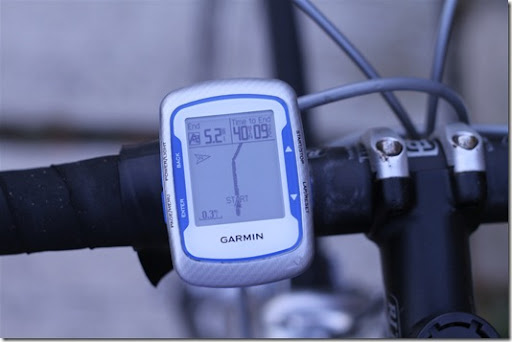 ?imgmax=800[/img]
not sure if the 200 does courses?
manual mentions courses..
http://static.garmincdn.com/pumac/Edge_200_OM_EN.pdf
[img] 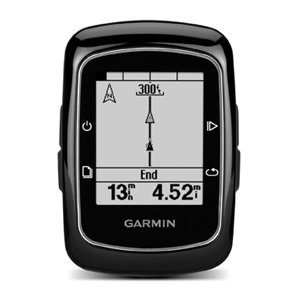 [/img]
rootes1 - Member
^ i have found my 500 completely hassle free.
As training aids they are terrific but trying to use them as mapping devices is ugly. I'd really like only to have a 500 but I need the mapping functions and thats where the trouble begins.
rootes01 looks the same as the Edge 200 by looks of it. Assume it only beeps at you when heading the wrong way and not everytime your 20 yards away from route heading the right direction?
Don't ignore the non-biking ones either, cheaper, decent bike mounts available, do most things except the training specific stuff and run on easy to find AA batters. The dakota has a similar screen to the edge 800 but is lots cheaper.
Quoting myself from another thread;
Try and get an older Edge 205 or 305. They do the breadcrumb/course following but you can also do 'proper' navigation where you plan a route (on computer) and it alerts you with a beep when you are approaching a waypoint and then shows you which way to turn (only downside is that it is limited to 100 waypoints max).
Basically the old 205 and 305 do navigation better than the current 200 and 500.
Is the Edge 200 mapping same as eTrex follow the line therefore?
How many data screens will the 500 show at once?
All Garmin questions and more are covered by DC Rainmaker on his product Reviews bit of his blog at
http://www.dcrainmaker.com/p/product-reviews.html
Garmin's websit "support" bit allows ewe to download the instruction manuals to read before you buy the product too.
Press and hold down the bottom left button to
Bring up the clock on a Garmin 200, then press the ride
Button to go back to the main ride screen.
Was just about to say the the Edge 200 does have a clock.
See above.
If you really need the GPS for off road riding then buy a proper GPS.
The edge 800 is the best bit of biking gear I have ever been bought. ( ex gf guilt trip!)
To have all the info and the mapping at your fingertips is priceless, and if you can afford to splash out on yourself then do it.
I have a forerunner, have seen the 500, but the 800 hands down wins every time.
I got an 800 a month ago. Great for maps,(especially if you can work out how to get some sneaky 1:25 maps on there); great for plotting a route (sorry course - those in the know what I mean); and great for recording your route....
....but turn by turn navigating off road along your course - bag of shite, still haven't got mine to do it properly yet; and the software, that's a bag of shite too - drives me up the bloody wall that you can plot your course on your OS maps through Garmin base camp but you can't toggle between and edit it on Google Earth, so go to Garmin Connect and you can plot your course on Google Earth but not use your own maps.
I have learned to live with it's short commings and stopped stressing over mad pink lines (another one for those in the know). 7 out of 10 (maybe 6.75)
rootes01 looks the same as the Edge 200 by looks of it. Assume it only beeps at you when heading the wrong way and not everytime your 20 yards away from route heading the right direction?
one alert.. 'off course' then if you get back on course 'course found'
there is also a breadcrumb so you can get back to the course.
not like proper mapping on the 800 though
on the bike, on the road - have nothing but praise for my old Garmin Edge 705; really grand as a training tool but wouldn't want to rely on it for navigation. Off road and for navigation if you want to stick with Garmin then you're either looking at the Edge 800 or something like the Oregon 450...
but turn by turn navigating off road along your course - bag of shite, still haven't got mine to do it properly yet
Hi ex1. I had this working as intended the other week but tbh, its still a bag of sh1te and I've gone back to the old way. I wouldn't bother putting any effort into sorting it out, you may be curious, but even when it works its horrible.
Basically, its a whole series of little white square patches that flash up withan audible beep-beep-beep at (or a set distance before) every turn. You get a turn left or turn right movement when you need it. Sounds great.
Two major probs:
First, it doesn't take into acount junctions were you get a meeting of more than 2 trail options. There often is (at places like Swinley) a sort of node of 3 or 4 trail heads, say 2 left 1 right, but you've no idea which one of the left options till you get the "off course" buzz. It also seems to use slightly different "deffinitions" of what is a left, a right, or just straight on. Not consistently though, just randomnly enough to really put doubts in your head. I guess this is something to do with no map being a perfect representation of what's actually on the ground, but you really notice that when you're only getting directions.
Bringing me to problem 2, the white message panels for the directions obscure the map below so you've got nothing to refference to for making the decision on which turn. Its not just when you get the flashed up message box either. Your "pinkline" trail has a whole series of smaller little white boxes on it at each of the upcoming turns (think I had about 300 on a 20km course) that obscurs the map on every point where you need to make a turning decision, wher you'd really rather like to see the map. Its equivalent to losing the backround map in order to gain the "directions". You have to just trust what it tells you when it beeps, ride by "sound", and be prepared to do a lot of backtracking when there's more than 1 option and you get the dreaded off course buzz. You can't even see if the "wrong" trail you're on meets back to the "right" one and just go with the flow, 'cos your map's obscurred by the p1ssy little white boxes. GGGGRRRRRRRRR!!!!!
As you can probably tell, I'm not the greatest fan of the off road directions. However, with that switched off and easy viewing of the built in map (which for me is what the 800's all about) then its brilliant and I love mine.
GB Discoverer Maps v3 are routable, I don't think the versions before were routable.
This site has loads of info on the Garmin's:
[url= http://frank.kinlan.co.uk/garmin-edge-800/dummies-guide-to-the-garmin-edge-800/ ]http://frank.kinlan.co.uk/garmin-edge-800/dummies-guide-to-the-garmin-edge-800/[/url]
Turn by Turn directions should be easy, create a course with [url= http://www.bikehike.co.uk ]BikeHike.co.uk[/url] and add the turn directions, download as TCX or download as TCX straight to your Garmin. Job done. 😉

