
Subscribe now and choose from over 30 free gifts worth up to £49 - Plus get £25 to spend in our shop
I have a Polar OH1+ optical heart rate sensor, and log the results with Polar Beats on my iPhone 11.
However, I need an app that allows me to crop the results so I can average a specific section of the ride (I want to calculate my threshold heart rate and for that I need to crop the ride afterwards somehow).
Anyone know an app that can do that? Ideally I'd like to be able to see my heart rate as I'm riding along too (Quad Lock mount on the way).
The "dashboard" of Polar Beats is perfect, so maybe an app I can export to later is what I need?
Strava can crop a ride if you can get it into there.
Can you upload the ride to Polar Flow? That doesn't do cropping but you can use sliders to isolate a section of the ride and see the details (e.g. average and max heart rates) for that section.
@zilog6128 Given I log my rides on Strava I should have remembered that [facepalm].
@slowoldman I can upload to Polar Flow on my phone, but I can't find the sliders you mention. Sounds perfect for me!
I can upload to Polar Flow on my phone, but I can’t find the sliders you mention. Sounds perfect for me!
Ah it looks like that bit only exists on the web based version - flow.polar.com
If you go that on a computer, log into your account and select a workout, at the bottom of the screen you will see this:
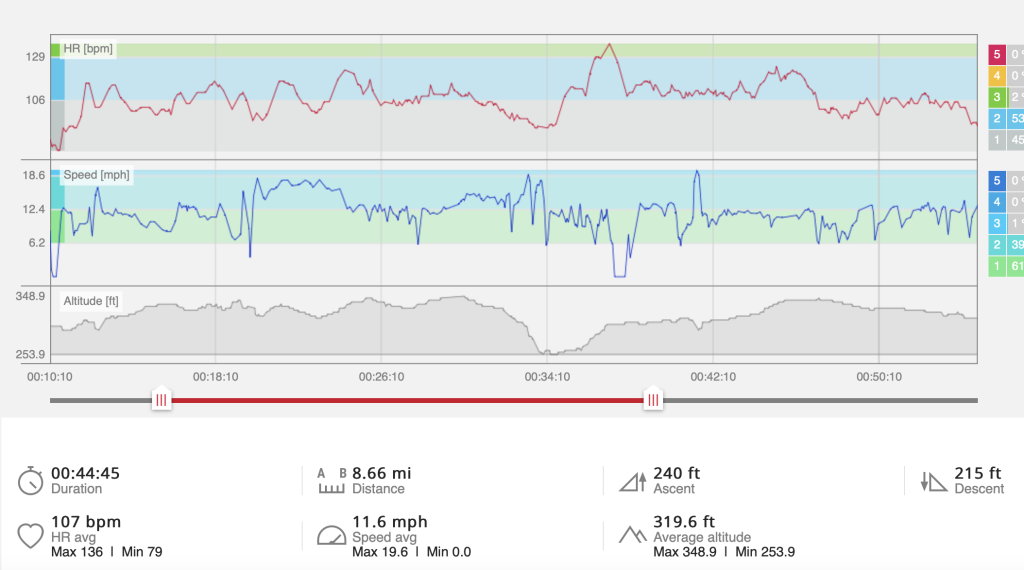
Note the sliders and the results for the selected part underneath.
FYI I use an OH1 HRM with Polar V650 and M460 bike computers uploading directly to Polar Flow on the Mac (though on the latest M1 Mac the V650 is no longer supported so I have to upload rides via the iPhone app using Bluetooth). Otherwise I don't generally use the iPhone apps. Polar Flow can then be linked to 3rd party apps. I currently use Strava, VeloViewer, TrainingPeaks, Intervals.Icu, Crickles. Lots of nerdy data to ignore.
Oh and you can create rides in Strava and other apps (I like cycle.travel) export GPX and upload to Polar Flow giving you a route to follow either on the app or (in my case) on the V650.
Thankyou @slowoldman, that's exactly what I needed.
Just got to flail around tomorrows TT to generate a 30 minute+ trace on the app and I'll be able to set up my zones properly.
Thanks again from a tech-inept person 🙂
https://intervals.icu/ will take 98% of your best 20min heart rate to alert you of Lactate Threshold Heart Rate changes, it's up to you if you feel the reading is valid enough to alter your LTHR in settings.
I recall that Polar Beat app is no longer updated and all the features and more can be found on the Flow app.
As far as I know Polar Flow doesn't record activities, it takes input from devices such as a GPS watch or bike computer. Polar Beat does record activities in much the same way the Strava app works (i.e. used instead of a watch or computer). Activities can then be analysed on Polar Flow.
I just had a look in the App Store and Polar Beat was last updated 3 weeks ago.
If you access the pull down menu in the phone Flow, there is the option to Start which allows you to record activity. Presume your OH1 is linked to the phone.
Yes, I don't have the funds to buy a Garmin etc at the moment, so recording on my phone with Beats then it syncs the ride onto the laptop via web based Flow as suggested by @slowoldman above.
It's working for me and what little I want to do 🙂
If you access the pull down menu in the phone Flow, there is the option to Start which allows you to record activity.
Ah it would appear my Polar Flow is out if date as it doesn't have the record feature - my iPhone is too old to update it but I use a bike computer anyway. So @oldnick it would seem if you have the latest Flow app you can record directly on that rather than Beat.