UPDATE: CLASSIFIEDS section refreshed, redesigned, searchable: Go take a look
[i]As self-confessed technoclutz khani said, the multi-touch interface on the iPhone is excellent. It is intuitive and has proved very popular[/i]
I am, 😳
Intuitive is the key word with iphones
EDIT I may have to kill myself now, as I promised I wouldn't get into the whole android/iPhone [s]Battle[/s] debate,
EDIT2. Sent from my iPhone, by me ME!!!!!! all on my own as well!
I'm rubbish you know...... 😆
Iphone 4 is pretty simple to use. Great for emails.
Shite for phone calls though.
(Typed on my iPhone 4 btw)
I got a 3GS, I'm too tight to actualy pay anything for a phone if I'm paying a contract, no issues with calls either
My 3GS and 3G were fine for calls but the 4 really is shocking! About 30% of my calls end up on mute, ended or me calling someone else. I stick with it though for the increased battery life and better screen. Tried android/desire and won't be leaving iPhone again, crap by comparison in my experience.
Do you have a particularly weird shaped head or outrageously large ears? 😀
Because it sounds like you are somehow managing to press the touch screen during a call without the rest of your head being close enough to trigger the proximity sensor that turns off the screen.
Either that or perhaps yours just has a duff sensor.
Anyways, no such issue here. 🙂
[img] http://www.teltarif.de/gb/xda-guide-o2-testbericht/news/33451:4.html [/img]
XDA Guide, tis tiny, has touch screen and joypad thingy. Got mine on fleabay new for under 130. Has GPS runs memory map and thousands of free downloadable apps for windows mobile. Even has a car satav that works really well too. You can also get an extra large long life battery for them, 3G all that jazz too.
Edit - iphones are for teenage girlz and [s]morons [/s]people that need buttons.
[i]Edit - iphones are for teenage girlz and morons people that need buttons.
[/i]
Good point, well put......
Another iPhone user If I can use one any one can
iphones are for teenage girlz and morons that need buttons.
Eh??
Is this not an "XDA Guide"?
[img] 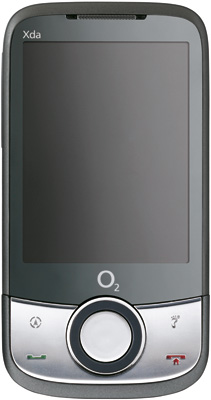 [/img]
And are these not buttons?
[img] 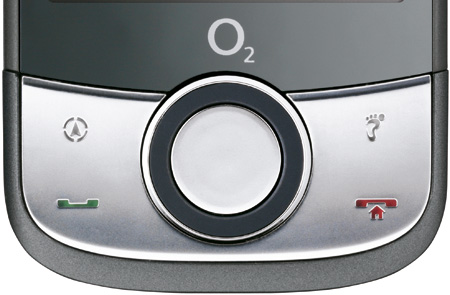 [/img]
In fact it looks like it has more buttons than an iPhone to me... so does that make you more of a moron? Or just a teenage girl 😉
Hi Aus I haven't had time to read all the above - good luck wading through it 🙂 But I use an HTC TytnII/Kaiser - and as you know I'm an old fella like yourself - coincidentally someone has one for sale on main forum (not me!) [url] http://www.singletrackworld.com/forum/topic/fs-htc-tytn-ii-windows-mobile-smart-phone-with-gps-os-mapping-cabable [/url]
For some reason I have a vision of khanis dad, from another thread, muttering in the background 'Bloody phone, always on the bloody phone that boy'....
😆
It was guitars and the sex pistols that set him off...
thanks all ... helpful stuff
The iPhone does have buttons, you just don't need them for most purposes, the home button does get used fairly often, for using apps that are in the background for example. As most of the people I know with iPhones (and that's eight or nine), most are blokes, and several would likely punch the poster in the nose for suggesting they're girls for using one. Clot.
The query about backup needs a bit more clarification. When you connect an iPhone to your computer, it usually, if specified, opens iTunes and iPhoto. You can set it to open them manually if all you want is to charge the phone. Once iTunes is open and seeing the iPhone you click 'Sync', (having specified 'manually manage music and video'), then iTunes will backup everything on the phone. Should you be unfortunate enough to break the phone, lose it, or get a new upgrade one, you connect to iTunes and click 'restore from backup' .
Simple. It's much better to manually manage music, you just drag and drop and away you go. All your apps will be backed up into iTunes, and all updates can be installed on the computer ready for any backup.
On iPhones the answer is just "iTunes does it".
Simple, see?
Not really: you have to download it, install it, set up what accounts you have to synchronise, and finally work out how the thing works. If it were a better designed piece of software this last step might be easy, but sadly that's not the case.
Edit in a second post, especially for the OP: the iPhone's a very nice telephone, and once you've started thinking the Apple Way it's very easy to use. It's nicely put together, and is one of the better looking phones available. It's just a pity you're stuck with that dog of a software package, if it weren't for iTunes I probably would have got one!
you have to download it, install it
Once and it takes five minutes. (Don't you need to download and install HTC Sync?)
set up what accounts you have to synchronise
?? Nope.
finally work out how the thing works.
Default setting is you plug in the phone and it works.
I use an HTC TytnII - coincidentally someone has one for sale
How much?! Messiah on a velocipede, I tried to give mine away not eight hours ago, and got turned down.
I got this HTC Desire HD because the screen is the biggest I could find, & hence the on screen buttons are mens finger size. 🙂
I'm a luddite on technology matters, but this thing was very easy to set up.
Mate with an iPhone reckon this is better because of the screen.
When I bought a new iphone 4 to replace my 3gs, i just plug it into itunes and it synced everything, all my links, contacts, texts, emails, apps everything, including the information on the calculator. Simplest swap over ever.
Spent 2 years with iphone and it's a great phone and dead simple to use. Mine started to get very slow and temperamental however.
Could in no way justify the cost of an iphone 4 so now I have an android motorola defy; superb and much nicer than my iphone. A tiny bit more fiddly in terms of software but in no way a challenge. Feels better made too.
TBH - I find iTunes to be overly clunky & not very intuitive
Anyway, can you manage texts with iTunes? the you could with a Nokia app I used to use, send/rx etc.
Or can it only be done from the phone?
I haven't seen a modern touch smartphone that isn't pretty simple. They're designed for anybody to use after all.
Does your son/friend/wife/dog have a smartphone already? You could get the same model then they can show you how to work it.
As most of the people I know with iPhones (and that's eight or nine), most are blokes, and several would likely punch the poster in the nose for suggesting they're girls for using one. Clot.
A truly terrifying picture has been painted there
As most of the people I know with iPhones (and that's eight or nine), most are blokes, and several would likely punch the poster in the nose for suggesting they're girls for using one. Clot.
So we need to add aggressive, insecure idiots to the list of users? 😉
Does iTunes work if more than one user of the computer has an iPhone? What if the user doesn't have a computer, can they still get an iPhone?
(BTW. I don't really care whether anyone prefers an iPhone to an Androis or Symbian or whatever.)
Not really: you have to download it, install it, set up what accounts you have to synchronise, and finally work out how the thing works. If it were a better designed piece of software this last step might be easy, but sadly that's not the case.
Oh come ON! If you can't use iTunes easily, how the hell do you manage to get dressed and find your way out of the house in the morning FFS? 🙂
Does iTunes work if more than one user of the computer has an iPhone?
If you have separate profiles, certainly.
What if the user doesn't have a computer, can they still get an iPhone?
Good question. Connecting to iTunes is required to activate the phone - I've no idea what you'd do if you couldn't do that.
Good question. Connecting to iTunes is required to activate the phone - I've no idea what you'd do if you couldn't do that
As with iPads, pods etc. they'll help you activate it etc in an apple store IIRC.
thanks all ... any pros / cons of the nokia E72 as a 'simple' phone + email + googler?
miketually - Member
As most of the people I know with iPhones (and that's eight or nine), most are blokes, and several would likely punch the poster in the nose for suggesting they're girls for using one. Clot.So we need to add aggressive, insecure idiots to the list of users?
😆
I found my Desire easy to use once you get used to it and have it set up, after a couple of hours or so.
Aus - Member
thanks all ... any pros / cons of the nokia E72 as a 'simple' phone + email + googler?
Both Mrs M and I have E72's - got them before the iPhone 4 and other decent touch screen smartphones came out. If you just want what you said, plus connection to Outlook, GPS, reasonable camera etc they are great. Robust, good battery life, easy to type. Only slight downside compared to touch screen jobs is that the screen size is a bit small if you are going to do a lot of browsing
sony erricson xperia x10, love it.
looked at i-phone but the x10 was offered free in an 'over the phone' deal direct with orange.
anyway, the x10 is far better than the g1 it replaced both in terms of usability and toys - 8mp camera and great walkman. if you want smaller look at the x10 mini.
gavtheoldskater - you upgraded to android 2.1 yet? Makes it even better.
Will be selling my X10 soon if there's interest...sling me an email.
(FWIW for the OP I think the E72 might be better though. It's probably a better "phone" but less good at browsing/apps etc)
The only problem with the X10 series is they're stuck on an archaic version of Android with no sign of an update (unless that's changed since I last looked). It'd be a bit like buying a PC with Windows 98 on it. Shame, cos the hardware's [i]lovely.[/i]
they're stuck on an archaic version of Android with no sign of an update (unless that's changed since I last looked)
2.1 out now, pinch zoom multitouch update confirmed yesterday for early next year, followed by 2.2
So yes, a little out of date, but there are many other devices stuck on 2.1 also.
I've not found anything I'm missing from 2.2 that I'd want yet? (feel free to suggest things I'm missing out on though). I know 2.2 will make it faster, but it's one of the faster phones in the first place so it's not slow at all.
(only reason I'll be selling is I was given an N8 at the nokia dev. summit and plan to keep that - I don't need two high end phones)
Once and it takes five minutes. (Don't you need to download and install HTC Sync?)
Nope. To sync your address book, email etc. on HTC Desire, you just put in a sim card, turn on the phone, and type in your google login and password, and then as if by magic it is all there. If you have other email accounts, you put in the email and the password, and they are there. Apps etc. you download directly on the phone. I don't quite know what HTC sync is for really - never installed it on mine.
Having done work with iPhones, they are quite nice, and probably you'd be fine with one, but on the whole the interface just seems a whole lot less slick than the HTC somehow. It is very plain. I guess it is simple though, which is good for some users. It was slightly annoying that I kept having to go into settings (to turn wifi, 3g etc. on and off), rather than being able to do these things quickly. I also couldn't work out how to get calendar items on the front screen, something which is dead easy to set up even on the 8 year old nokia I have hanging around upstairs - I guess it is somewhere deep in settings, seems odd for such a basic feature.
I also got pissed off with the whole process I had to go through to get the iPhones to the point where you could actually use them - I had four of them, and it took pretty much a whole day to a)download iTunes, b)let it install the iOS 4 update, which it seemed to be very insistent about, c)turn on mobile me, d)install the apps I needed on the phone, e)make sure the settings weren't stupid. I also had a couple of the phones where the something went buggered up during all this and iTunes told me I had to re-flash the phone operating system to get it going (and reinstall apps and blah).
On the plus side, I do think they are better for music, assuming you manage your music on your PC, iTunes does make it nice, and if you're willing to spend the time setting them up it is quite easy, just a bit slow.
Joe
Does iTunes work if more than one user of the computer has an iPhone?
Yep. They can have separate iTunes accounts or share the same one.
Me and the wife both have iPhones, syncing to the same iTunes.
One advantage is that if one of you buys an app then the other gets it for free.
I don't quite know what HTC sync is for really - never installed it on mine.
Fair enough. I suspect the "backup via google" route isn't quite thorough as the iTunes backup. As well as your contacts etc, iTunes backs up all your apps, all settings, text messages, everything. If you restore a phone after you lose/break/upgrade then you basically have [i]exactly[/i] the same phone back again.
It was slightly annoying that I kept having to go into settings (to turn wifi, 3g etc. on and off)
Not something I do very often to be honest, but yeah it is four taps in so bit of a pain if you had to do it regularly for some reason.
I also couldn't work out how to get calendar items on the front screen, .. I guess it is somewhere deep in settings, seems odd for such a basic feature.
Nope it just doesn't do it. Not entirely sure why but it doesn't do any screen gadgets and the like. You can set reminders on Calendar items, which then pop up like a text message, but there is no home/lock screen widgetty thing.
(Both this and the quick access to turning off 3G, WiFi thing can be sorted by jailbreaking if you are so inclined)
I also got pissed off with the whole process I had to go through to get the iPhones to the point where you could actually use them - I had four of them..
Not a problem most people face. I doubt many have four iPhones and fewer will be using MobileMe (cos it is far too pricey and the find my iphone thing is about the only thing it does that you can't get for free)
Try the Orange San Francisco. Easily unlocked, Android 2.1 (2.2 probably soon), only £100 (£10 off from Orange for NHS /Council employees), GPS. Loads of clever /geeky guys modding & supporting them here:
http://android.modaco.com/category/453/zte-blade-blade-modaco-com/
Its the first phone I've ever paid money for, so I'm a long way from an expert but it does everything for me.
+1 for the Orange San Francisco. Unlocked mine for a couple of quid, got a sim only 12 month contract with T-Mobile for £10 per month that gives me more than enough data allowance (3GB).
Very happy with the phone, and very happy not being tied in to a stupidly long contract at £30+ per month...
2.1 out now,
Ah ok, old info then - it was 1.5 or 1.6 last time I looked.
I've not found anything I'm missing from 2.2 that I'd want yet?
App2SD is the main one I think. And Flash, perhaps. Other than that, it's evolution rather than revolution.

