I use the OS maps app quite a lot (I pay for premium subscription) for planning and plotting mtb rides, walks and for finding rides and walks that others have posted.

I'm having a lot of issues with exporting the gpx files from the app and wondered if anyone else might be getting anything similar?
I like to export the gpx files so that I can use them on my Wahoo Bolt and follow the route on my bars.
First thing is that when I hit Export gpx, I only get a very limited number of export options with seemingly no way to increase that.
I just have Google Drive and 'Nearby sharing' which isn't something I've used.
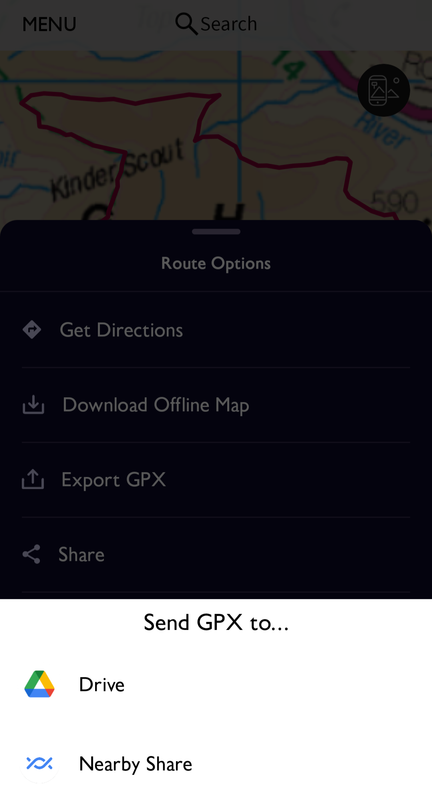
Quite often I will choose the Drive option and export it, and going to my Drive location the file is there but looking at the file properties, it very often doesn't seem to be an actual gpx file and trying to open it in my Wahoo Elemnt app confirms this as it tells me it's not a gpx file and it cannot open it.
Sometimes, I've found I can do a weird workaround, the steps of which I often forget but it's something like download file from Drive to phone, share it by email to myself, open it in email app and then 'Open with' wahoo Elemnt app. Sometimes that works, but often I still don't appear to be trying to open an actual gpx file.
Really weird problems.
I was trying to download a walk someone had posted on the os app yesterday and no combination of convoluted export steps seemed to give me the gpx file that the os app promised!
Gave up in the end and because it was a walk, just followed the route in the os app itself. Something I can't do when cycling, plus I find the os app less good for following routes than having it on my wahoo.
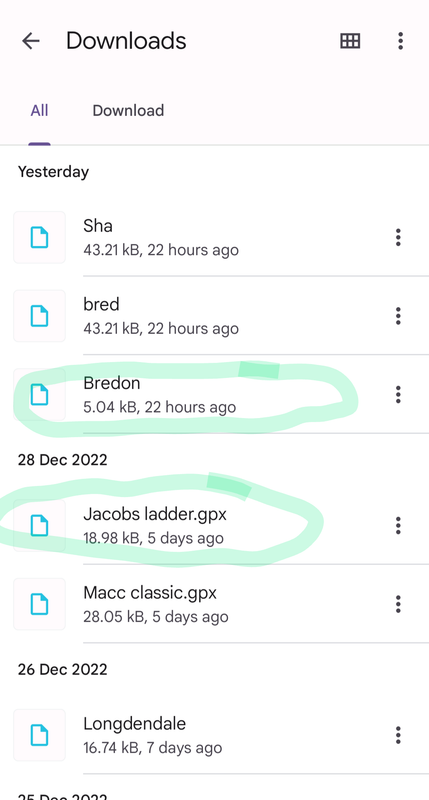
You can see in my Downloads folder on the phone that some of the files do not have .gpx following them and some do.
The 'Bredon' walk was supposedly a gpx export from OS maps, while the Jacobs Ladder file below it was a gpx download from a website, and that worked fine.
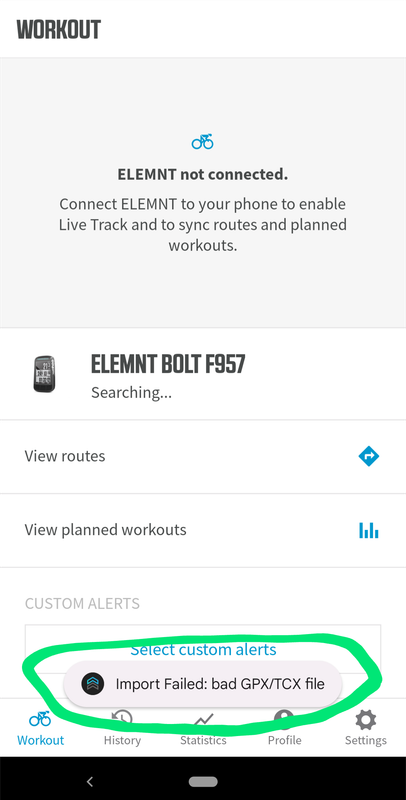
Trying to open up any of the files exported from os maps as gpx files into the Elemnt app gives me this.
Does anyone else use the OS maps app and have similar issues trying to export a gpx file for use on other devices?
It's frustrating to say the least.
It's not something I'd normally do so I've just plotted a route in OS Maps, exported it to Drive, done an "Open With" into both Komoot and Garmin Connect. Both worked fine.
Perhaps try testing it with a very simple/short route to see if it's a limitation of track points?
Can you do the plotting on a computer then export from there? If so, does that work?
Or can you plot on the computer and then open the android app and export from there? Does that work?
It is something I have battled with too. The method I have found that works is to export to one drive (I have that as an option on the export screen) and then open the file from there with garmin connect and then edit and save with that before exporting to my garmin.
This is all done on my phone, I rarely use it on the pc.
The osmapps app doesn't handle the file name properly. Mine always export as "shared routes from OS apps"
To fix this, I download the file and then rename it (via Android files app) , adding .gpx to the filename. I've not had problems after that.
I've tried renaming the file before I export, but that still causes issues with back country navigator ( but not sure other apps)
I think I do as slackboy does and rename the file before importing it. The file itself is fine just badly named.
The osmapps app doesn’t handle the file name properly. Mine always export as “shared routes from OS apps”
To fix this, I download the file and then rename it (via Android files app) , adding .gpx to the filename. I’ve not had problems after that.
Strike a light! That worked! 😂
Stw is bursting with genius! Thank you 😊🙏

It's so weird that it does that.
I don't know why os maps doesn't allow me to export it directly to my phone though. I always seem to have to go via Google Drive.
Thank you again. That's totes amaze 😊👌