Forum menu
my bro gave me his old macbook which ive been using, and i added my email accounts to it and must have de-activated his.
its still officially his account i spose as its his name that comes up on boot up, just with my email accounts in his apple mail rather than his.
he now needs some info from old emails from a couple of years ago but we cant suss out whether theyd still be available or not.
theyre from a yahoo account that he accessed through apple mail. yahoo doesnt seem to keep them on their server, theres nothing any older than 10 days on his internet yahoo account.
he DID file them in mail folders on this mac tho, but we just cant find any way of bringing them back.
is it a lost cause?
i'm out for the night but will check back on here to see if theres any hope later.
thanks for your help.
isn't in ~/Library/Mail and all that? POP ones, IMAP ones -- off the top of my head (mostly, though need to investigate in more depth as it looks like I'll to have to recover stuff from wife's dying 2009 iMac..)
yahoo doesnt seem to keep them on their server
That will be a client setting rather than the server not retaining data.
theres nothing any older than 10 days on his internet yahoo account.
Presumably something else has been downloading them somewhere then?
Might be worth pinging an email to Yahoo. My experience of support with them historically is less than stellar but it's worth asking the question.
kcal has it in the Finder, use the Go menu item and select 'Go To Folder' copy and paste ~/Library/Mail into the search box.
Mailboxes will be in the V4 or V5 or V6 folder nested in folders with hexadecimal names.
From Mail use File/Import Mailboxes and navigate back to the folder you found above and make sure you choose the import sub-folder option under the options menu.
You may need to copy the hexadecimal folders to a USB drive/stick to make it work.
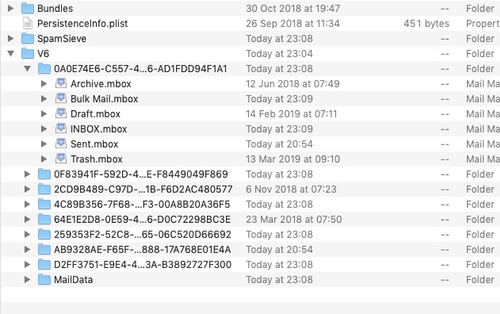
this is great thanks, we've uncovered loads of info he's been missing, we just need one more document from 2016. my problem may be that ive tried following the above with that search string but havent been able to carry out the second part of the paragraph, 'import mailbox' and then navigate, as i dont know where to navigate to.....
im only finding these documents by guessing at names and putting them in the search bar, i could really do with navigating to a physical folder and seeing what exactly is in there.
any idea where this V6 folder actually likes, or where i navigate to to import the mailbox?
thanks ever so much, been a big help so far.
EDIT: to try and explain better, when i find the V6 folder from that string, i open it up and theres a few different folders for mailboxes. they all have stuff like inbox.mbox, sent messages.mbox, drafts.mbox files atc, but no actual files. just mbox extensions.
i have to put in a word to search on, then it comes up with a load of relevant docs. none are the one needed so i click the back arrow which takes me to an empty page. type another word, more docs, back arrow, blank again. i could do with seeing these documents without having to guess at a word.
hi
its that time again...... bro's asking if i can find any emails or any document at all with a certain name to it, and for some reason, i cant follow the above advice like i did before.....
kcal has it in the Finder, use the Go menu item and select ‘Go To Folder’ copy and paste ~/Library/Mail into the search box.
i have no 'Go' menu item, just a few icons at the top of finder, none of them 'Go'.
'import mailbox' needs me to find the mailbox on the pc somewhere but ive no idea where.
anyone wish to try and assist this donut? 😀
thanks
You know, I'd be sorely tempted to swap the hard drive (SSD time!), do a fresh install of OSX and give him the old one back. Then he's got everything that was on it and it's no longer your problem to sort. (-:
the text menus will always appear (quite small!) in the very top left hand corner of the screen, they don't appear in the floating window like (I think? been a LONG time) they do with Windowsi have no ‘Go’ menu item, just a few icons at the top of finder, none of them ‘Go’.
‘import mailbox’ needs me to find the mailbox on the pc somewhere but ive no idea where.anyone wish to try and assist this donut?
failing that, the keyboard shortcut is shift-command-G