I currently download/watch BBC I player stuff on my PC, watching it on my computer screen.
What would be the best way to watch it on my 32in TV?
Cable connection? (if possible). Or is there a separate media type box I can purchase and plug into my router/broadband connection and simply connect to my TV.
Cheers
Virgin Media has iPlayer. You can also use a wii (pq isn't all that though if that's important to you) not sure about other consoles - be surprised if they didn't
[url= http://playstation.joystiq.com/2008/12/02/ps3-now-fully-supported-by-bbc-iplayer/ ]PS3 does too [/url]
Some freesat/sat boxes do as well, the humax ones do as do some others just an ethernet cable to the broadband router and you're off.
I have been looking at the wii, although I have played on one and really enjoyed it, I have never had much interest in games etc.
Just be aware, Virgin Media doesn't have all the iPlayer content
Surely there must be some cheaper options ?
I dont really use it all that much, but if its going to cost that much then I would prefer to spend the money on bike gear! 😆
XBMC on something with an ION chipset
E.g. this: http://www.thinkcomputers.org/asrock-ion-330ht-nettop-review/5/
Really really good. Plays h.264 hi-def no problems too, as well as giving you the weather, acting as a media library, dvd/blueray player, browse your digital photos etc
Have you got a laptop or is your PC near your TV?
If so then it's easy enough to hook up your TV as a display.
Have you got a laptop or is your PC near your TV?
All my gear is close together in the same room.
Just be aware, Virgin Media doesn't have all the iPlayer content
Is that true? I've never noticed anything missing.
PS3 has BBC iPlayer as well.
All my gear is close together in the same room.
Right, well it depends what video outputs you have on your PC and what inputs you have available on your telly, but usually you can connect them using either:
HDMI Cable (for HD tellies and modern PCs):
[img]  [/img] [img]
 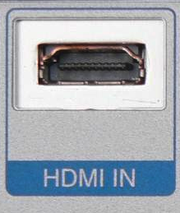 [/img]
VGA:
[img]  [/img] [img]
  [/img]
S-Video:
[img]  [/img]
GrahamS - cheers for that, just been looking on the web etc.
Both my Tv and laptop have HDMI sockets, could I buy a cable to connect both up then ?
Perfect, yeah get an HDMI lead and hook them up.
(Don't be conned into paying £50 for a solid gold, ion-aligned, pixie-dust magic one - it's a digital signal, so just go one-above-tesco-value and it will be fine - amazon have loads to choose from)
GrahamS, nice one, cheers for your help!
You may still need a audio cable as well though as computer HDMI outputs don't always output audio. A 3.5mm to RCA like this
[img]  [/img]
will do the job and they aren't exactly pricey.