Forum menu
From my PC to my iPhone 4s?
I just cannot seem to get on with iTunes, its always wants to sync, then it refuses to copy tracks onto my phone, or it deletes all my music off my phone and takes ages to backup which I dont want it to do.
I know the problem is me 😉 plus we have only one PC and a number of apple devices which we use with itunes, we have tried mediamonkey which is great with our ipods, but it will not let you copy music over with a 4s.
Something quick and simple to use would be great 😉
Disabling auto syncing in iTunes.
spotify.
iTunes is a bit of bloaty crap - but I really don't have any problem using it to put music/media onto my iDevices.
Turn off auto-sync as Drac suggests.
takes ages to backup which I dont want it to do.
The comprehensive iTunes backup is one of the main reasons I still use it!
Nothing quite like plugging in a new/replacement phone, restoring it from backup, and ending up with an identical setup to the one you had last week but in slightly shinier hardware.
Drac - ModeratorDisabling auto syncing in iTunes.
Yea I know its something simple (thanks Drac) that I am missing every time I want to change tracks on my phone, but with 3 other ladies also using this itunes software here, the settings do get messed with all the time, plus its does seem to hate me for some reason when I come to use it 😉
but with 3 other ladies also using this itunes software here, the settings do get messed with all the time
Pretty sure that setting is per-phone isn't it?
[img] 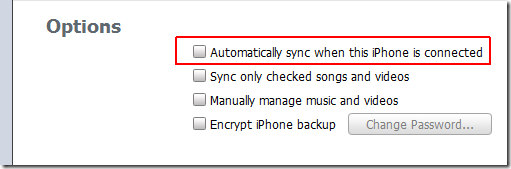 [/img]
Something like mediamonkey would be great, where I can just add and delete what I want, without worrying about syncing, backing up everything, every time I want to add a track to my phone
Something like mediamonkey would be great, where I can just add and delete what I want, without worrying about syncing, backing up everything, every time I want to add a track to my phone
Or iTunes it only backups anything new and yes as GrahamS says it allows you to setup for individual devices.
A good tip that has worked for me for years with minimal fuss. Create a playlist called, for example, "iPhone Music". Whenever you're sat in front of iTunes and think "I want that album on my phone", simply add it to this playlist.
When the phone next syncs the playlist will sync and you'll have your new music without faffing around ticking and unticking which albums/songs/artists you want. Since the iPhone can sync wirelessly anytime it's charging, you don't even have to think about this method.
OK will sit down and read up a bit more on itunes, maybe it does like me after all 😉