UPDATE: CLASSIFIEDS section refreshed, redesigned, searchable: Go take a look
In Germany and the text is in English.
I am getting a virus software for android pop up...
I just got the lovelinks pop up. (S3)
Am I safe? 😯
2 days using Opera & no pop ups yet.
Fingers crossed.....
The only way I managed to stop it is by disabling java script in the content settings of chrome.
Hi Guys, any fix on this yet , i cant access STW on my phone anymore as every thread I try and open I get the lovelinks popup . My phone is a galaxy S3 . Strangely on my android tablet all seems ok . I am in NZ if that helps .
I'm in Viennna on an S4 roaming network (o2 uk). Same message.
Nothing on my iphone 4 (bob network)
Just happened on DarkRoastedBlend - told me I need to check my Android for a virus.
Which is interesting, since I'm using iOS 7!
I can screenshot it (if I can get it again) and send it to someone if it helps. Oddly, it happened way down a page, not when I first got to the page.
Also got several pop ups from something like ib.adnxs.com telling me that JellySplash is the best selling game or something
Me too in Australia since installing IOS 7.0.4 last night, particularly the Jellybean one.
[img]  [/img]
Thanks for that. I have added more filters just now. lets see if I've got it. Keep reporting if you see this or anything like it. I'm not always on the forum so email me direct mark@singletrackworld.com and I'll be able to work from mobile when I'm out of the office too.
It's an industry wide issue that is causing havoc just now. Just to reassure that it's not an exclusive STW issue. There's a lot of people searching for the rogue ad networks that are pumping this crap out.
Chinny reckon
OT sorry...but that took me back 25 years. Thank you.
Had the original problem on my Motorola Xoom2 (Andoid ICS running chrome and chrome beta). AVG free reports nothing bad happening, but it's annoying as hell and making me question using the tablet until I can factory rest it/wipe it.
Getting popups on my iPhone, only on STW...
This is making STW virtually unuseable on my mobile. Nexus4 on giffgaff. Android 4.4.2. Only happens on STW
[IMG] 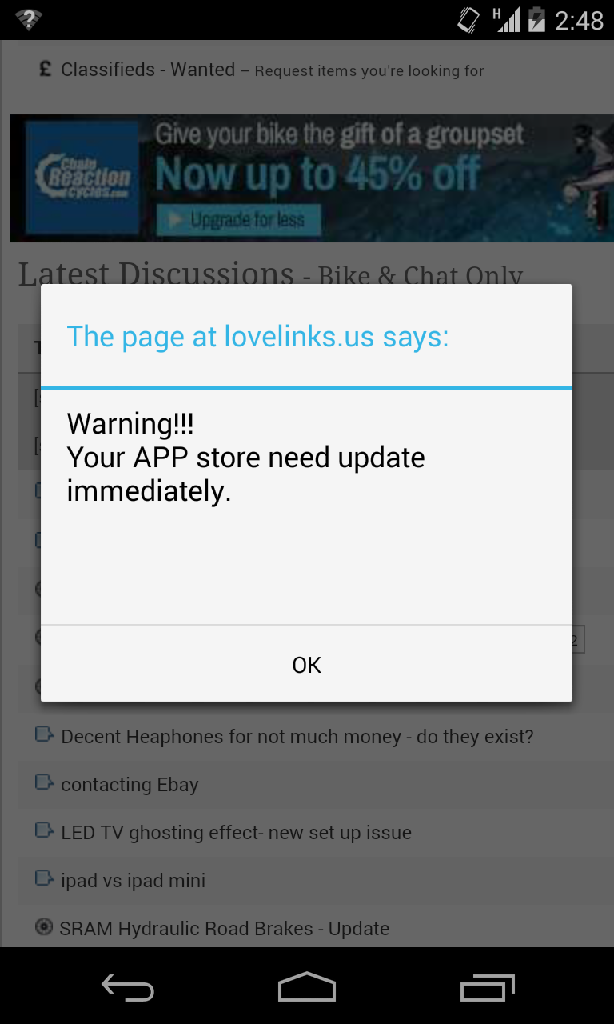 [/IMG]
Should add, virtually no apps on my devise and those that are are from large respected suppliers like TomTom, BBC, garmin etc. No kids stuff like ringtone editors or prawn....
I think from what Mark's said is that one of the ad servers that STW use has 'acquired' some infected ads.
Each time they're displayed the javascript kicks in and that's when the problem occurs.
Issue seems to be identifying which ad server it is and which ads to block.
[img] [/img]
/p>
Same as trail rat, I've been getting this popping up all day on here.
Not getting it at all on any other sites.
O2 3G/4G connection on iphone.
Those ad networks are not ones we use but I've added them to all the filters we have anyway. I've even disabled a host of ad networks other than the ads we contract directly with bike companies (which are all either flash, gif or jpeg) and Google ads, which are about as safe as it's possible to be, from appearing on android devices at all.
This morning I turned off each network in turn and we still saw reports of this popup. I'm going to keep looking and I'm in contact with our network ad managers at the various ad companies - they are all scratching their heads too and they are receiving reports of the same from lots of other sites too.
I'll keep looking and please keep letting me know if it occurs on your device. Over Christmas it's best to email me directly mark@singletrackworld.com
Possibly slight devil's advocate, but isn't there a case for STW pulling ALL their ads until this is resolved?
The situation seems to be that there are popups being served to users that link to malware? I know that STW aren't the ones causing it, but they are knowingly continuing to carry the ads, in the knowledge that some of them are "bad" - is that not slightly irresponsible?
Or have I misunderstood the malevolence of these? (I've not had any yet myself)
If you experience this problem, please post or email me with:
OS with version
Browser with version
List of enabled plugins (usually at about:plugins)
Please also try clearing your cookies:
http://singletrackworld.com/clearcookies.php
I just got the lovelinks pop up again.
Could you provide the info that Tom asks for above?
Oh if you could also indicate which country you are in as part if the info that will also help.
Cheers
Now keep being taken to the iOS App Store periodically, but quit it before it takes me anywhere. iOS 7, iPhone 4S, Australia. Only noticed it on wifi so far...
Thanks for the report. We are still searching for the culprit but this does seem like a much wider internet problem that a great many sites are battling with. The ad networks are all looking into this with some urgency too.
I had this last week on my Android device running 4.2.2. Never had it on any other site. I kept getting the dialogue box about a virus with only the "OK" option. I wasn't logged in at the time, but when I logged in (ads disabled) the problem went away.
There's a bit of misinformation in this thread in regards to Android and their relationship to virus's from drive-by style banners.
In short, unless you are installing APK's from non-Playstore sources, you have nothing to worry about. You don't need AVG or Malware bites.
If you're installing APK's from non-Playstore sources that aren't trusted then you may be at risk.
If you don't know what an APK is, you won't have a virus as you have to allow you phone to accept non-appstore APK's in the first place.
The worry stems from a few years ago when Google we're not vetting their Playstore. People would add apps to the store with malicious content under tempting names such as "The REAL 50 Shades of Grey - what your wife DOESN'T want you to read!" or whatever - a lowe and behold people with less "computer savvy" minds would download some spyware that would take photos of their nostrils on the front mounted cam. Whatever.
However Google went on a massive cleanup a few years ago after they were being embarrassed by Apple's appstore with their "tighter-than-a-nuns-(use your imagination)" style of app approval and the security for end users that came with it.
In it's current state the Google Playstore is the safest it's been. As always - read the comments first. Apply some common sense. But if it's from the Playstore - you're golden.
TL;DR: An Android phone cant install anything NOT from the Playstore by default. Unless you've told it to do so in the past, you're 99% not infected with a virus or malware.
I'll add that I used to get the lovelinks one quite a lot but clearing my cache resolved the issue. Not seen it for a while. Wasn't worried about security, as plyphon says, unless you tell it to install, it won't.
i, too, am having this problem....
Sony with Android.... other sites are fine. when opening a thread a little window pops up saying:
"The page at lovelink.us says:
1 Virus found
Dwnload, Install & Run a
Complete Threat Scan Now.
--------OK-------------"
me being a complete luddite (and there being no option for "no") pressed ok.
now have some app, 360 Mobile Security, on my phone.
even with this app the window still pops up.
what is going on and how do i sort my phone out? will restoring fatory settings remove any bugs?
[i]Wasn't worried about security, as plyphon says, unless you tell it to install, it won't. [/i]
followed by:
[i]
me being a complete luddite (and there being no option for "no") pressed ok.
now have some app, 360 Mobile Security, on my phone.[/i]
makes me wonder how many people now might be having everything they do on their phone being sent to some server in Russia/etc?
Well, that's interesting... Seeing as I am on an iPhone, and therefore (I assume) pretty invulnerable to any malicious software, I let the App Store load all the way to wherever I was being hijacked to.
The answer: Candycrush bloody saga. What's all that about then????
I just got the lovelinks pop up, again.
Still in West Yorkshire, still on a Galaxy S3.
[i]now have some app, 360 Mobile Security, on my phone.
even with this app the window still pops up.
what is going on and how do i sort my phone out? will restoring fatory settings remove any bugs? [/i]
Go to settings->apps and delete that for a start.
That 360 App appears to be a "legitimate"* app - it's in the app store which is how it worked it's way on to your phone.
Which means it's likely a safe app and isn't harvesting your limbs for Russia.
[url= https://play.google.com/store/apps/details?id=com.qihoo.security&hl=en_GB ]360 Link to Playstore[/url]
However, that doesn't stop the company using deceptive tactics to get you to install it in the first place, which is what is happening here I think.
* Whilst the app itself might be legit and not harbor any malicious code to skim credit cards, it may be legitimately sending data or something else about your usage or whatever for the owners to sell on or worse. I personally wouldn't install it under any circumstances.
I run Lookout virus protection on my phone.
It just blocked a pop up from
Stw and have the option not to display the message again.
For those getting the problem it might be a solution.
I have both an iphone and s4 .
I have no issue with the iphone but lovelinks.us warning on chrome and android internet (whatever that is).
I know I shpuld have stayed with IOS as I never had a problem with it.
This S4 is bloody awful phone.
Is there a fix for this yet?
have you tried Lookout - works for me?
LG g2, Android 4.2.2
Htc one,
Still keep getting the lovelink crap!
I have noticed an add that looks dodgy, it appears at the top of the page and looks like a Facebook bar but with no writing, just a flashing message icon, when I clicked on it it tells me I've won a free app, obviously I've not gone any further but could this have anything to do with the problem?
Still happening. Nexus4, kit kat.
[IMG]  [/IMG]
iolo - MemberI have both an iphone and s4 .
I have no issue with the iphone but lovelinks.us warning on chrome and android internet (whatever that is).
I know I shpuld have stayed with IOS as I never had a problem with it.
This S4 is bloody awful phone.
Sorry to spoil your moan but [url= http://singletrackworld.com/forum/topic/ios-add-pop-up-anyone-else-jelly-splash ]people are having the same issues on iOS[/url]. The problem is with the advert providers and is absolutely nothing whatsoever to do with the OS or browser which is simply displaying that data it is served.
Might as well add here - I'm getting an annoying "You've won an iPad!" pop-up (and automatic redirect).
Only happens on STW and only some of the time, so assuming it's ad-related.
I'm in France and the message is in French.
Windows 7, Firefox.
I dont get anything at all... on notebook, ipad or S3 phone.
Just read this all the way through, and so far I've not seen any of these pop-ups, either on my pad or phone.
However, I usually only go on here in the evening, and that's via wifi at home. Since this issue popped up, (s****), I've not had an opportunity to grab sneaky looks at STW while at work, so no idea about over phone networks.

