I've been out for a run with my Garmin Edge 500 a couple of times now, and both times it hasn't recorded the run correctly at all !
OK its not a running specific device, but I cant see why it shouldn't work? I haven't used it on the bike for about 4 weeks, but it worked fine at that point.
Is it knackered or am I doing some thing wrong?
[img] 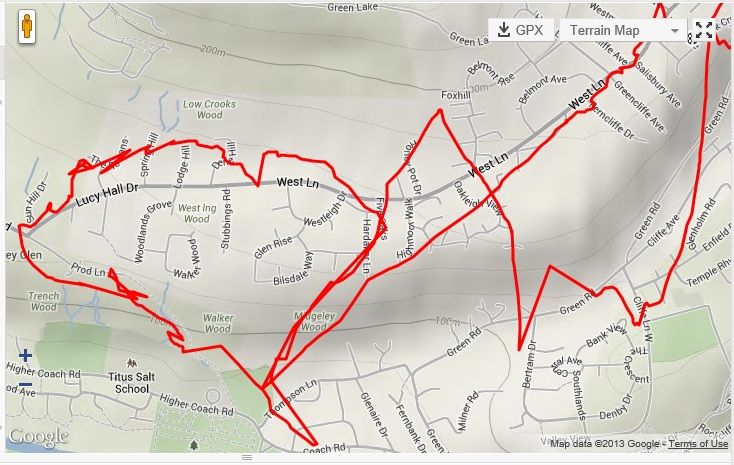 [/img]
Bump..
Where do you have the 500 when you run?
Only time I've had real issues is if I don;t let mine get a good signal before I start off and am under tree cover for a lot of a ride or run.
You can get odd traces if you're still for a while with the gps running. Maybe you run so slowly it's getting confused 😉
Can you set the sampling rate? Is it set to auto pause below a certain speed?
I keep it in my shorts pocket, which are very thin.
Daft question but I assumed it wouldnt let you start recording a route unless gps was locked on. (Im just used to using a mobile and Endomondo which would start tracking until signal locked) How can you tell on the 500 if the signal is locked?
Will try and have a look at sampling rate and auto pause tonight.
Could all be down to poor reception. If the 500 is built to assume that it's lying flat on your bars, then being vertical won't help. Also, your body will be blocking the signals.
For running I have a Garmin wrist strap for my 500 from Amazon.
Prior to that was in my pocket and never had any problems.
There is one area that nearby where my signal always seem to drift a lot but could be due to the high trees and houses on either side?
Mine was way off when I got it. AFAIR, I checked the firmware was theccurrent one (it was) and set a waypoint called Home outside my house, manually setting the correct elevation.
It has improved massively but has never been as good as my 705.