UPDATE: Reviews section refreshed, redesigned, searchable: Go take a look
Its a Huawei phone
LOL. I was going to ask specifically if it was that brand, though the old Nokia tends to rule out my idea.
Motors / microwaves / fluorescent tubes / etc etc can all interfere with WiFi. You could try splitting the network into its 2.4 and 5 GHz sub bands.
Motors / microwaves / fluorescent tubes / etc etc can all interfere with WiFi. You could try splitting the network into its 2.4 and 5 GHz sub bands.
That would affect all websites and general loading speed though, electrical interference doesn't discriminate!
Perhaps it's solar flares, have you tried blowing up the sun?
Best suggestion yet!
The wifi itself is strong and only shows the few devices I have running. For context we are in the middle of nowhere, 6 miles from a mobile signal and have been getting our broadband via a microwave radio link transmitted up the valley to my barn and then via a radio link to the house and from the radio link via a little black box and then a WAN cable link to a Nokia Beacon 2 just above my head. The beacon is the wifi router and also has a single LAN cable which is connected to the PC. Wifi connected devices are limited to my phone (Huawei), wifes phone (Nokia) wifi card in PC, Laptop, the TV when it is switched on, and my Victron Cerbo GX controlling all the solar and battery gubbins in the cellar. The system has been running pretty much faultless for the past 8 months and only recently started to play up. I will call the tech support on Monday to see if they have changed anything since nothing my end has been (knowingly) altered.
The fact that running a VPN fixes it may suggest a DNS issue??
I'd say that the fact that the VPN fixed it makes it more likely that it's a DNS issue. Now addresses aren't being resolved locally, but sent down the VPN tunnel and will be resolved by whatever DNS service the VPN provider is using.
Did you ever try changing the DNS address as many people have suggested?
The fact that running a VPN fixes it may suggest a DNS issue??
I mean, maybe. It's certainly possible, but I'd say it's unlikely. DNS probably isn't different on wifi vs. wired, unless you've deliberately set it for a given device. It's also kinda improbable that it would affect some sites but not others.
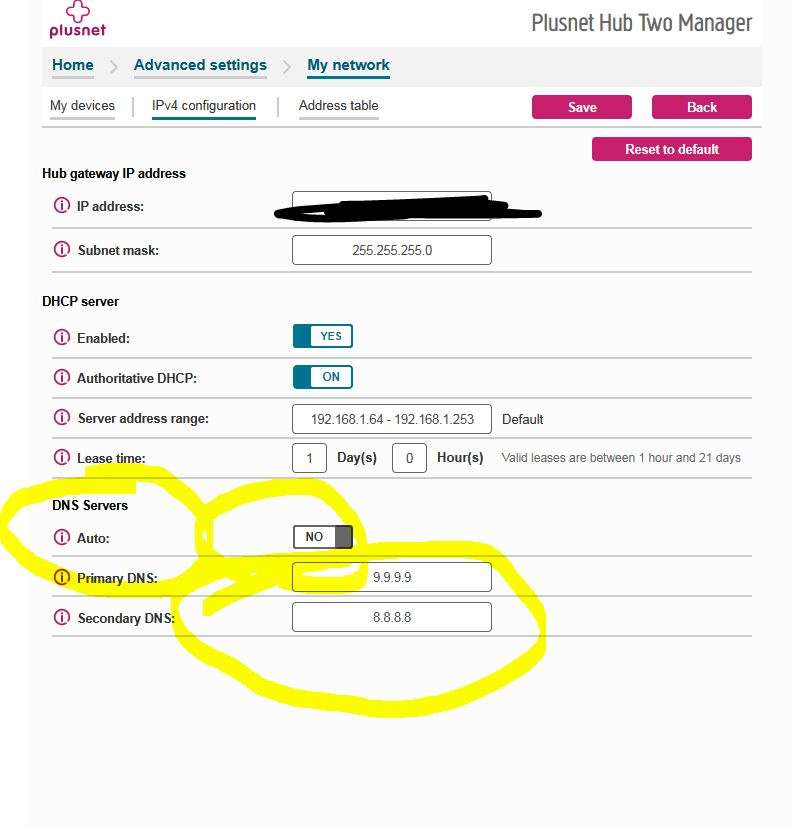
There did not appear to be any way to change the DNS in the router as suggested by Mattyfez above (they were set at 8.8.8.8 & 8.8.4.4)
Can you get anything useful from the Firefox network monitor?
https://firefox-source-docs.mozilla.org/devtools-user/network_monitor/
I tried the PC on wifi last night by pulling the ethernet cable. It was the same as the phone. Some websites work, others didn’t. Exactly the same ones
I have just pulled the ethernet cable so the PC is forced to run on wifi and what do you know. All working hunkydory.
Which is it?
Exactly my thoughts. Last night the PC didn't load the same websites on wifi as the phone. Today it did!
Whatever the issue i I am beginning to think it is a bit illogical and something only my ISP will be able to explain. This is a problem as technically I don't really have a service provider at the moment as the whole system to provide high speed broadband to the valley has been a shambles to be honest. I am just happy that it still works at all. I really really don't want to go back to copper cable and 2 mbs speeds, nor do I wish to put any money into Elon Musks coffers.
I expect that the issue is with your router, given as everything works fine wired. So, I'd be very surprised if your ISP could tell you what's up, unless they've got some very clueful support people.
You could try sharing setting up a wifi hotspot on your computer (keeping your computer connected wired). I would expect that to work the same as your computer.
It might also be worth switching your phone to ipv4 addressing only, but I'd be surprised if that fixed things.
Also also, if your router had a dynamic range of IP addresses it hands out and a separate static range it keeps reserved, you could try manually configuring an IP in the static range, rather than using DHCP.
It might be that your router is ****ed then, if it's a router suppied by your ISP, then as @cougar said... get onto them to send you a new one, they are only 'rental' routers as part of the contract of servce. I.e. they will ask you to send it back if you switch suppliers.
So they should send you a new one if yours develops a fault.
Oh, and although it doesn't feel like DNS to me, it would be worth manually configuring your phone to use 8.8.8.8 / 1.1.1.1 for DNS rather than taking the routers DNS, just in case your router has a bad cache (and somehow your computer is configured with a different DNS server).
I was the same re Elon Musk, i'd rather not give that knobber a penny of my money, however being in the same situation as you in a rural farm and with fibre infrstructure happening god knows when, I took the plunge with Starlink, I look at it as a stop gap until the SNP fulfill their promise of giving every house hold in Scotland a fibre connection by 2022🙄. Starlink has been great, consistantly see speeds over 250mb.

