UPDATE: Reviews section refreshed, redesigned, searchable: Go take a look
Help me please!
How do I add pics with my posts? Do they have to be hosted on flicka or some thing else?
Sure do, then you link to the then image address using the IMG button
We really need a sticky for this question.
http://www.singletrackworld.com/forums/forum-help/
[img]  [/img]
See the singletrack mtb magazine logo at top left?
Right click on it and select 'properties'. You'll see that the image address (URL) is: 
So, to post that pic, you write:
{img} {/img}
But instead of using the curly bracket I used {} you use the square ones []
Simples:
[img] [/img]
I'm using a Mac so there is no right click!
I have pasted the HTML from flicka after pressing the IMG button but still no joy?
No sympathy from me in that case. Go solve it yourself or better still, tell your Mac to 'just make it work' 😉
EDIT - Flickr can be a bit funny and it looks like you've just copied the web page address in. The pic address will almost certainly end in .jpg
i you could right click you go to propertys and copy image url ending in jpg. then paste it into the middle of
[ i m g ]url.......ending in jpg. [ / i m g ]
without the spaces mind 😉
chuck85:
I'm using a Mac so there is no right click!
CTRL + Click then, or if your on a macbook/pro two fingers on the mouse pad + click.
....anyways for Flickr:
1) Go to your photostream for example: http://www.flickr.com/photos/46004836@N02/
2) Click the picture you want, say for example 'Snow by Carn Kenidjack'
3) Click the 'all sizes' button just above the top left of the pic.
4) Once you have picked the size you want, for this example i selected the 'large' image, right click the picture and select 'copy image address'.
5) Go on to STW click the [size=15][u][b]IMG[/b][/u][/size] button above the text box you are writing your reply in and right click and paste and you should have something like this :  . Hit ok and your done.
on your flickr page , just above the photo there's a wee magnifying glass and the text 'all sizes'. click on this, then on the new page do the two fingered tappy thing on the photo if you're on a mac and select 'copy image address. Back to stw, click the image button, paste the link and click ok.
[img] 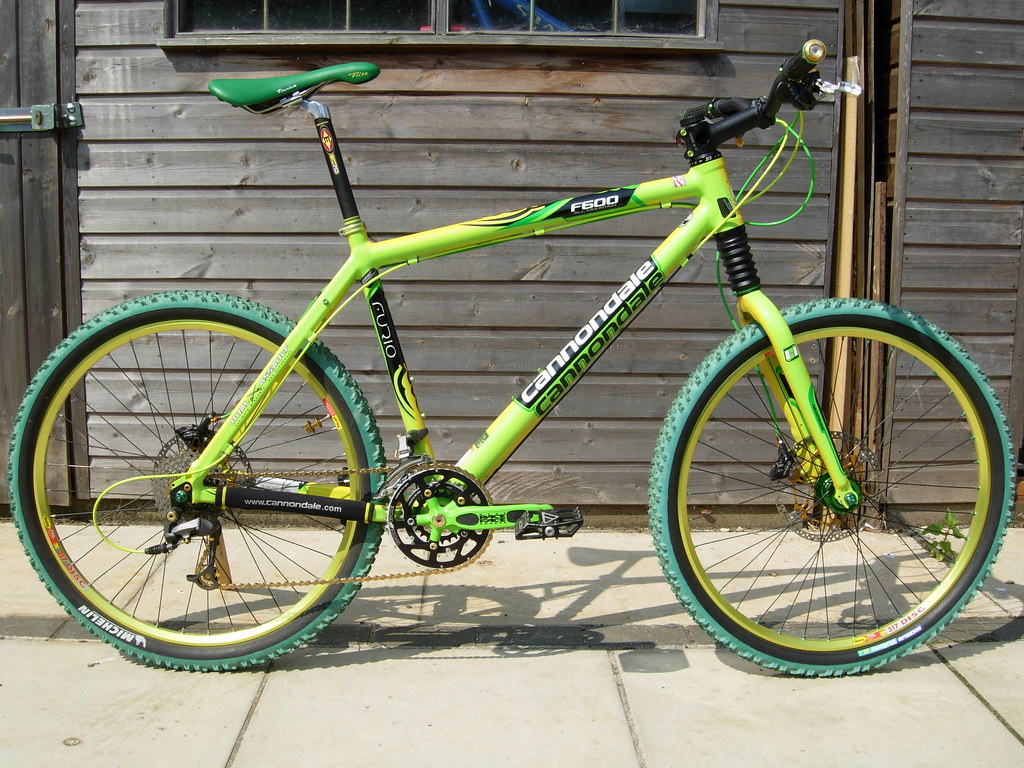 [/img]
Just done all that! Easy peasy!
Not URL - IMG! You're pressing the wrong button!
*bangs head against wall*
Incidentally, regardless of how big you pic is, the forum will scale it down so it does not break formatting of the site.
Amazing! When using Flicka it seems that you have to get the URL after selecting the size of the pic not from the share photo options!!!!!!!!
🙂 Got there in the end so cheers for everyones help, you can now all see my rad green bike!!!!!!!!!!!!!!!!!!
you can now all see my rad green bike!!!!!!!!!!!!!!!!!!
I am almost wishing i hadn't helped 😉
Ditto. That is proper fugly. Good for commuting visibility I guess 😉
And as for the prostate ticking saddle position... Well...

