UPDATE: CLASSIFIEDS section refreshed, redesigned, searchable: Go take a look
Thanks all. Couple of months until my birthday so might play around with my phone in the meantime.
I can take a route from Strava and fire it into the OS app
How do you do that? Is it automatically synced or is it a case of downloading it and zapping it over with a usb cable?
Asking for my mum.
Do you know what happens when you (knowingly) detour off course with a Beeline? Does it direct you back to where you left; to the nearest part of the route; to the nearest waypoint…?
It depends on how you have the app set up. On the motorbike I have it set to re-route and it just directs you to the next waypoint. For offroad tracks and .gpx uploads you can't reroute*, but in my experience if you miss a waypoint it will try to direct you either to the waypoint you've missed or the next waypoint, whichever is closer.
*yet. They're constantly updating and adding new features so I can't imagine it will be too long if it's feasible.
So... thanks to this thread and a slightly swollen Paypal account... Ordered a Explore
Got my Edge ready to put on Ebay. Took this photo

Powered it off. Removed the micro SD. Powered.. erm, tried to power it back on. Dead. WTF?! Winding me up to the very end!
Help meeee... I’ve got OS mapping on my Edge 1000 (oh, its working now) and i dont remember how i got it on there. Its on the sd card. How do I get it on the Explore? default mapping is rubbish.
Hmm. I am interested in this too as I have ordered an Edge Explore and will be most familiar with OS mapping.
Hmm, lotta dosh, but ...
https://shop.ordnancesurvey.co.uk/activity-gear/os-collection/os-gps-devices/os-trail-2-gps/
You buy it on an SD card.
I had OS maps on my Edge Touring and ended up selling them on, because they were bitmaps and when you zoom in you just get pixels. I found the Garmin mapping (which is Open Streetmap based) to be much more useful tbh. The only downside is that you can't see what's a RoW and what's not. But otherwise it was better. I do consult Backcountry Navigator on my phone if I need to know about RoWs.
Millions of Google results later, I find this
https://www.the-thorns.org.uk/mapping/help/ukgarmin.html
£15 for whole of UK. I shall report back
OS maps on my Edge Touring and ended up selling them on, because they were bitmaps and when you zoom in you just get pixels
musta been an issue with the Touring, or the maps you had (zooms in a lot closer)
[img] 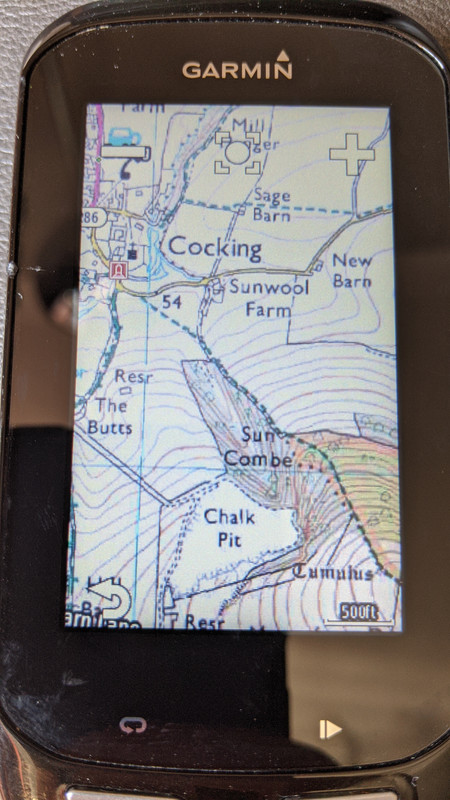 [/img]
Usually my Lezyne Super GPS works great including auto re-routing, albeit it doesn't do staggered junctions well at all.
However, I was reminded on Saturday about the negatives, as a consequence of no Three mobile reception on the Mendips plateau and then poor reception heading south west from Cheddar... The navigation went nuts and I had to stop every few mins to grab my mobile out of my back pocket to get my bearings, having saved a big area on Google Maps offline (which then only gives basic navigation for cars and not bikes).
Fortunately, i was only ~13 miles from base and decent reception plus navigation resumed after a few miles, otherwise it would a pain in the backside.
On my way back from Rodney Stoke yesterday, a chap I met combined his Garmin for recording with his iPhone(?) in a bar mounted quadlock for navigation.
musta been an issue with the Touring
Yeah it had a small low res screen, for sure. But maybe I'd bought the 50k maps rather than 25k? I don't remember now.
Edge switches between the 50K & 25K pretty seamlessly when you zoom (Just wish I could remember where the hell I got the mapping from!!)
Got the OPENGB maps from the-thorns.org - heres a screenshot to compare with OS above. Similar area.
The contour lines are a bit too bold, but apart from that looks nice, should be easy to follow.
[img] 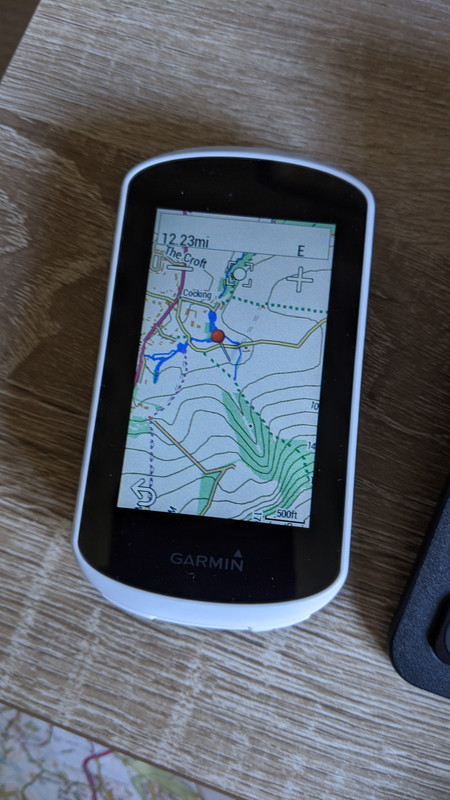 [/img]
This seems to be the Garmin way to buy OS (style?) area mapping - https://buy.garmin.com/en-GB/GB/p/86339#overview 3000km2 for £20

