UPDATE: Reviews section refreshed, redesigned, searchable: Go take a look
Thanks to everyone on this thread. It inspired me to get off my arse and upgrade The memory of my late 2009 iMac
Now 12Mb instead of 4... Easiest memory upgrade I've ever done. The mac mini was a mare.
Much better. Had slowed to a crawl...
Wish I could speed up my five year old iPad ...
@Strato cool, now for kicks BlackMagicSpeedTest 😉
@stoatsbrother - What did you put in? Did you just stick another 2 x 4GB on top of the 2 x 2GB that were already in there?
@jamba you are hereby forgiven some of your other sins 🙂
8) (edit: my experience of forgiveness is that it has a short half-life)
@beamers you don't [b]need[/b] matched pairs or even (i think) and even number of chips - if you have 4 slots you can do 2+2+8 in my experience one 8gb chip was cheaper than 2x4 In theory matched pairs are faster but in practice it makes no difference to our usage
so where am I now? Tonight I wanted to open a word doc, it took about a minute to open, same with email. Browser opens quick and loads pages fine, but then back to a Microsoft product like excell and it takes forever???
@jj - I have the same issue with mine. Once its up and running its fine but I have to wait ages for MS Office programmes to load up.
I downloaded [url= https://itunes.apple.com/gb/app/memory-monitor-speed-up-your/id748212890?mt=12 ]Memory Monitor[/url] for mine which threw up the following result:
[img] 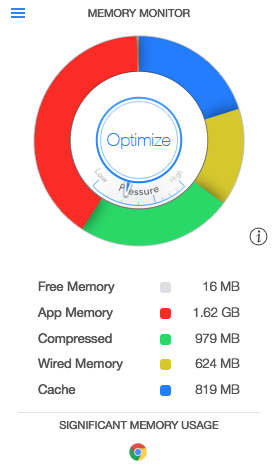 [/img]
Its got 4 GB of memory in it at the moment and pretty much all of it is in use!
@ Jambalaya - thoughts?
Its got 4 GB of memory in it at the moment and pretty much all of it is in use!
That's a good thing. OS X is designed to make use of all available memory, no point having it and it not being used!
^^^That makes a lot of sense!
Mac OS X will pretty much use all the memory you have available - it doesn’t necessarily mean you have too little. It has a lot of functionality to keep things in memory that would just be pulled from (slow) disk otherwise.
Mind you, when what’s basically a jumped up text editor is taking up 1.5GB, then the World is a messed up place… #bringbackvi
Rachel
[img]  [/img]

