UPDATE: Reviews section refreshed, redesigned, searchable: Go take a look
My boss is going on maternity leave soon, but wants to have a good teleconferencing setup in place so she can be 'in' meetings and have one-to-ones with us from home. Skype on a tiny laptop screen with built-in webcam, tinny sound and a flaky connection ("Hello, can you hear me? I can hear you...") is not going to cut it...
What would the hive mind recommend? She's getting fibre broadband installed so her home connection should be pretty good. Should we look at any of the commercial packages or just invest in a couple of good cameras & soundbars? Is Skype actually fine if you have a good connection and configure everything correctly? Advice please...
Get a headset for skype.
One with two earpieces.
No using the meeting roim on speakerphone for 4 people type set ups.
Slack?
Then can be used for general communications as well as for jumping onto calls.
We find it invaluable for our remote workers.
Never tried it for conference calling though - if you need that I don't think it would work.
Skype with headsets....(and better internet connections if it's poor quality)
We use it communicate around the world without any problems.
Get a headset for skype.One with two earpieces.
This, or a better camera / mic at the office end if that the problem.
If you company is using 365 look at 'Skype for Business' it has more functionality than Skype, share screen, messenger etc (oh and it sort of tells you who's working and who isn't 😉 )
If you company is using 365 look at 'Skype for Business' it has more functionality than Skype, share screen, messenger etc (oh and it sort of tells you who's working and who isn't )
Yep. This.
*Sets status permanently to Appear Away*
Skype is fine. Of the commercial packages zoom meetings seems to provide the best quality audio.
Thanks for all the quick responses!
Headsets probably fine for one-to-ones... what about her being 'in' group meetings. Table mic and speakers, but still with Skype? Any product recommendations for said table mic?
For additional reference - it's a small company, all fits in one large room normally. We don't have our own meeting room though the building has several we can use - but putting our own permanent hardware in them might be tricky...
In my experience it just doesnt work. Unless someone has a strong hold on people behaviour in the room. Hence everyone uses them inprevious.
Skype for business functionaliry is also incredibly useful as mentioned above
Just spend the last two days on a Cisco Webex meeting/screen share with someone in France.
I used a over-ear headset with a boom mic, as did he, and it was superb. Proper audio quality meant listening to him was extremely easy, I was quite surprised. Far better than a typical conf call.
For group meetings I would get a tablet or laptop and put her on video on the table, perhaps with a speaker or using something loud enough. People can talk to a face much more easily than a disembodied voice.
My company recently started using Bluejeans. Would recommend.
MS surface hub for the meeting room (can be wheeled out if on a TV stand) and MS Skype for business is the optimal. The surface hubs aren't cheap though.
My boss is going on maternity leave soon, but wants to have a good teleconferencing setup in place so she can be 'in' meetings and have one-to-ones with us from home.
Doesn't she trust you to do a good job?
Cant quite see how she is going not be more of a hindrance than a help...
Zoom? Seems to be used a lot , unfortunately I've only seen it used by perverts but as a group meeting device it seems to work
Doesn't she trust you to do a good job?Cant quite see how she is going not be more of a hindrance than a help...
How did you leap to that conclusion?
Doesn't she trust you to do a good job?Cant quite see how she is going not be more of a hindrance than a help...
It's a small business with a lot going on all the time - especially before & over Christmas because of what we sell - and she is (& needs to be) very hands-on... she's a great boss, as it happens!
Zoom
Or google hangouts
Any product recommendations for said table mic?
[url= https://www.jabra.co.uk/business/speakerphones/jabra-speak-series/jabra-speak-510 ]Jabra Speak[/url] is good
Blue Yeti mics are pretty decent for the money
Yep. Found Jabra Speak to be good. I am freelance and often work as my clients sole rep in large construction projects worldwide. Often in remote locations. Used all manner of apps software etc. Skype is as good as any. All depends more on connection quality than the app/ software IME but then I am often in construction camps in middle of Africa/ former USSR country etc etc. Lync worked really well on one project as cut down a lot of useless e mails and sharing screens etc. was really good.
Discord is currently going after skype in a big way, its voice communications are already far better, and hit has just released video too although i haven't had a chance to try this yet.
I use lync/skype/whatever it is called now all the time. Works nicely most of the time although best with the proper meetings as opposed to adhoc.
In my experience though with both lync and old fashioned conference numbers having a mix of people in a room and others remote rarely works.
Best, even if most people are in the office, to dial in from their desks or have everyone in the room.
We've used Zoom at work. Very nice.
Skype is fine, its the hardware or connection that usually lets things down.
For meeting rooms we use Devio from BiAmp - expensive, but great for proper integration.
A more out of the box movable version is the Logitech CC2000
Both are USB so work with Skype, WebEx, Bluejeans, Slack, whatever.
EDIT: We have a 'video on' cultural thing - if you just want audio, Jabra Speak, Plantronics P610 or a Bluetooth thingy off the market will be adequate.
Our service is provided by Intercall. I have no idea how expensive it is, but the call quality is usually excellent.
A Skype for Business user here and it's pretty good. I used to use GoToMeeting but, to be honest, SfB does pretty much everything that GTM does.
If she's going to be the only one working remotely, then no need for her to have a conference adapter, a decent set of headphones and a good mic will work well. If she does want something she can put on a table, Jabra do a thing that looks like a hockey puck that works well enough.
I'm usually the guy phoning in. Just use my iphone. The office has dedicated conference phones in the meeting rooms, like this.
Sound quality is fine. Not interested in doing video in the slightest.
I'm NRATS but get a decent-sized screen and speakers, a tablet or laptop is pretty crap for that sort of thing once you're past one-to-ones. We do regular teleconferences, most often using webex but there are many alternatives. It's not really about the software, more the connection and hardware.
Remote working with conference calls via Skype etc is great. Never works properly so I can end up dropping off the call or can't get on it, and avoid the meeting entirely 😀
MS surface hub for the meeting room (can be wheeled out if on a TV stand) and MS Skype for business is the optimal. The surface hubs aren't cheap though.
With the greatest respect you're trying to make an old solution, that was fairly crap, work better with new, and very expensive hardware.
If you *really* want to gather everyone around a table to watch someone on a big screen there is better kit for the job, but it's a bit old school to say the least.
Most places don't bother with video now - it really don't add much, better to share a screen to display what you're talking about rather than your winning smile, but some people still like it.
It's better to allow people to stay at their desk, use a headset (partly because it's easier to hear and partly because it saves your neighbour from having to hear it all) you can add a webcam if you really want to but - you can have up to 16 people on a video call anywhere with a web connection, or 250 on an audio call (more if you pay) obviously a 250 person audio call is actually a presentation rather than a meeting so you'll want to mute the bulk of people unless they need to speak.
Headsets are cheap and easy to use, Skype for business works very well and if you've got 365 it's part of the package.
Use it for a while and my pie in the sky vision of the future where office monkeys like me can all work from home seems not only doable, but better than what we have now.
it really don't add much, better to share a screen to display what you're talking about rather than your winning smile
Isn't that what the Surface Hub is doing? It's a shared display rather than simply a video conferencing thing.
It's better to allow people to stay at their desk, use a headset
I'd agree with that. Echoey meeting rooms are the number one cause of annoyance on conf calls, for me at least.
Does mean that your neighbours will have to listen though.
Isn't that what the Surface Hub is doing? It's a shared display rather than simply a video conferencing thing.Does mean that your neighbours will have to listen though.
Yeah, but in this respect it's just a 'big telly' for everyone to share, it's a £7000 to £20,000 big telly (to be wheeled out on a £3000 stand).
But really, for the OPs needs, and that of most organisations everyone sitting at their usual desk, watching their usual display is more practical - yes your neighbours can still hear you speak, but that's only the same as if you were on the phone, most office monkeys have long learned out how to filter that out.
Most places don't bother with video now - it really don't add much, better to share a screen to display what you're talking about rather than your winning smile, but some people still like it.
That's contrary to my experience - not that it doesn't add much, but the demand for it is there from all tiers.
Old fuddy duddies go for full VC codecs with HD video and side presentation. Cisco Spark is currently under investigation here to add a bit of collab in a friendly way, and encourage a move from face + slides, but there's still a place for that. Telepresence rooms are dying out though.
Hip young millenials like me (ahem) go for video as a side bar, and don't care about the quality too much - audio and collab are more important, video is usually a room view to wave at each other to start and finish.
Echoey meeting rooms are the number one cause of annoyance on conf calls, for me at least.
That's solved with a decent audio solution in the room (beam forming mic and a bit of DSP), and headsets if you're not. There's always one person using the PC internal mic and hammering the keyboard...
Jabra 500 series is good but if you have several people in meeting room it is better to get 800 series device as it has more mics and stronger speakers.
We have had video meetings at work since 90’s and yet these days it is mostly SfB meetings. I don’t get the desire to have the video on all time, quick “hi” at beginning is more than adequate and then you can concentrate on the content.
If your boss would like to be on top of things she could invest to telepresence devices. How lovely it would be to have a roaming camera and microphone in the office all the time?
Cisco Spark
We use Cisco Jabber and WebEx. Everyone complains about it and we'd much rather have stuck with using Skype for Business.
I'm home based, most of my time is spent on calls with people outside the UK. Have a Logitech USB headset thing ([url= https://www.logitech.com/en-gb/product/usb-headset-h390?crid=36 ]this one[/url]) which works well and is ok to use all day.
Video calls, no one bothers, just use voice.
I would like a decent whiteboard solution though. Trying to use a virtual one with a mouse or trackpad is just a bit awkward.
Oh and Flashheart, really like that video 🙂
I would like a decent whiteboard solution though. Trying to use a virtual one with a mouse or trackpad is just a bit awkward.
BenQ make some good ones that don't cost £20k or so 😉
Do like the look of the Jamboard thing but I'm not paying 5k for it!
just like what @mmannerr said, Skype for business on the upgrade package if with 365, and Jabra kit. I battled hard with my company to sort themselves out and finally got the upgraded Outlook with Skype 365 (the upgrade will give you a dial in number as well - i think its E7 package), and a good speaker mic. I've got a an 800 series in the main office, and the atellite office is going to get the 700 series. PLugged in through USB it's brilliant sound quality (don't use bluetooth as it's sh1z)..
I had all manner of people moaning, but the upgrades and kit was all installed this week and we've already used multiple f2f with dial in conferences and people are impressed.
you can gt entire Cisco and Polycom kits, but they are overkill for you..
mrblobby - Member
Cisco Spark
We use Cisco Jabber and WebEx. Everyone complains about it and we'd much rather have stuck with using Skype for Business.I'm home based, most of my time is spent on calls with people outside the UK. Have a Logitech USB headset thing (this one) which works well and is ok to use all day.
Video calls, no one bothers, just use voice.
I would like a decent whiteboard solution though. Trying to use a virtual one with a mouse or trackpad is just a bit awkward.
Oh and Flashheart, really like that video
you'll be wanting the new Microsoft surface hub then, yours for a cool £6K..
she needs to get a [url= https://www.amazon.co.uk/Double-Robotics-1001-Telepresence-Robot/dp/B00K2Z8LRW ]remote presence robot[/url] so she can wander round the office
[img] 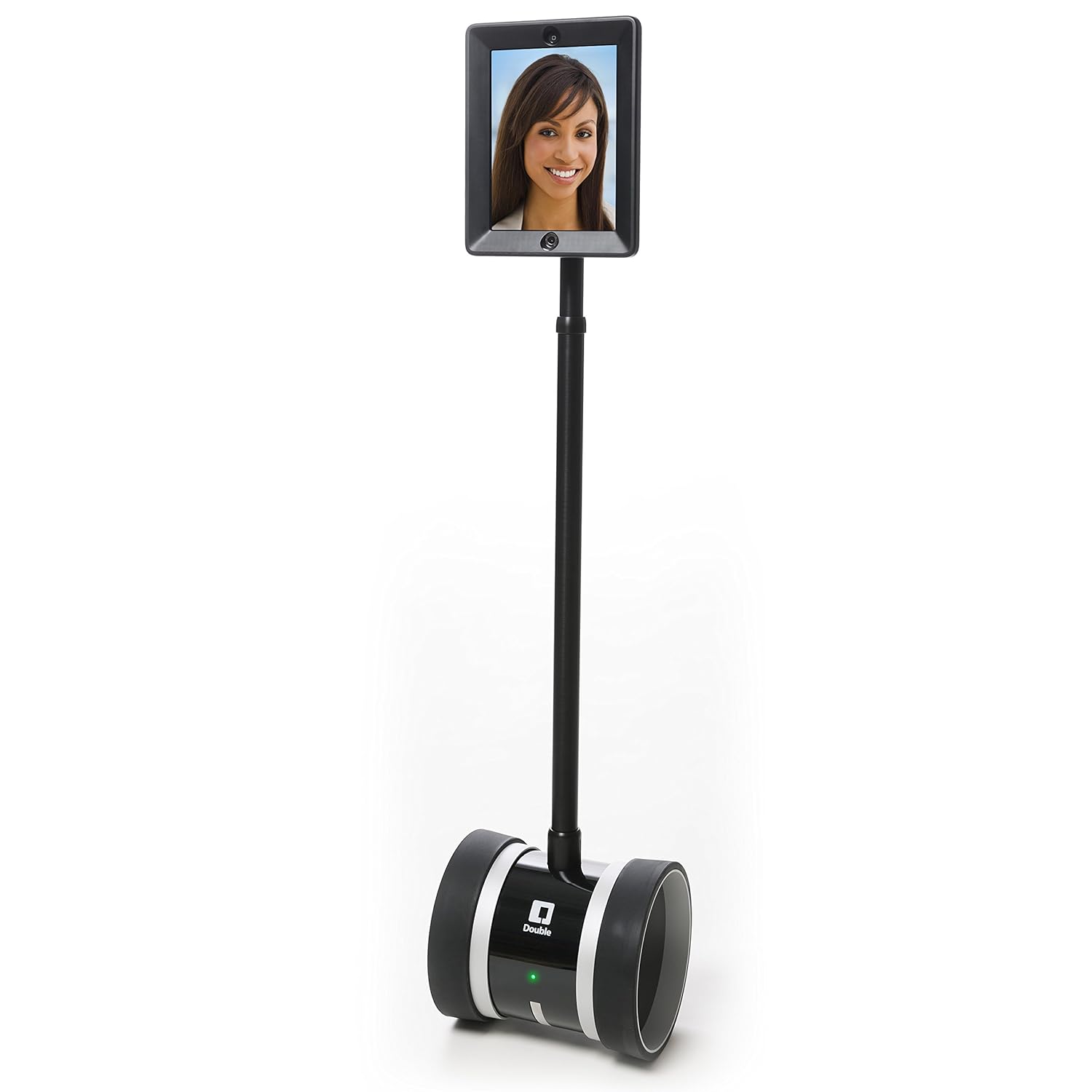 [/img]
Our work solution is webex and the call quality is so much better with people using PC based headsets rather than phones.
We use Skype for Business with headsets.
Chuffing great product, screen and (effectively) application sharing, you can pass control of documents between 'callers', integrates with MS outlook and with good broadband it's reliable and clear.
Our laptops have decent built in. Webcams if you want to video call. No good for a room full but great for two or so people on a video call.
My business partner is 1.h hours away, we work all day with hangouts open to have our virtual office and share screen when we need to. Couldn't work without it
Can I recommend the company I work for.
www.circleloop.com
The Jabra stuff works very well with it. (In fact we are starting a partnership with them).
I do the Android app btw.
https://www.commstrader.com/reviews/circleloop-cloud-phone-system-review/

